Showing posts with label EXCEL. Show all posts

Sunday, 23 November 2025

Excel + AI: The New Standard for Financial Reconciliation

 Excel + AI: The New Standard for Financial Reconciliation

Is your team still manually matching rows in Excel?

Microsoft has released the Financial Reconciliation Agent (part of Copilot for Finance). It lives inside Excel but connects securely to your Dynamics 365 data. It automates the comparison of disparate datasets—like your Bank Ledger in D365 vs. a bank statement file.

What it does:

You connect Excel to your live ERP data. Copilot analyzes the two datasets (e.g., "Internal Ledger" and "External Statement") and automatically matches transactions based on amounts, dates, and descriptions. It then generates a reconciliation report for you to sign off.

Key Benefits:

  • Flexibility: Works with any data you can load into Excel.

  • Intelligence: AI suggests matches that standard rules miss (e.g., slightly different descriptions).

  • Speed: Reduces hours of "stare and compare" work to minutes.

Technical / Developer Input:

To make sure your custom Finance tables are available for Copilot to read in Excel, you must expose them as Public Data Entities.

X++ Snippet: Ensure your entity is decorated correctly so OData can access it:

Code snippet
[
    DataEntityView(DataEntityView::Public), // Essential for external access
    DataEntityPublicName("MyCustomReconciliationEntity"),
    DataEntityLabel("Custom Reconciliation Data")
]
public class MyCustomReconciliationEntity extends Common
{
    // Define your fields and keys here
}

Official Microsoft References:


Get started with the Financial Reconciliation Agent

This video demonstrates the Financial Reconciliation Agent in action within Excel, showing how to connect to data and run the automated matching process.

Saturday, 12 December 2020

Microsoft Finance and Operations app integrations

Explore Microsoft Finance and Operations app integrations

A key feature of Microsoft Dynamics 365 is that you can integrate it with other Microsoft solutions and a myriad of third-party applications easily. Explore available integrations for the Finance and Operations apps.

Introduction


In this digital world, managing a business is about collecting and managing data. Let's assume your customer data is stored your Dynamics 365 Sales instance. You also have data flowing in from your Internet of Things (IoT) devices, which you store in your Dynamics 365 Supply Chain Management instance. You want to use this data to improve your business and create digital feedback loops. That means you need a way to have the data interact, a way to integrate the data across your Dynamics 365 applications.

You want to import data from Dynamics 365 Finance via Excel. Or you want to extend the functionality of one of the Finance and Operations apps using a third-party product.

Organizations using large enterprise resource planning (ERP) systems often find that it can be challenging to manage data effectively. This situation is especially true when with distributed data.

With the Finance and Operations apps, you can use the integration scenario that is right for you. The Finance and Operations apps make it easy to integrate with Office 365 and third-party apps. You can use the data management framework for data migration and management scenarios or use native Excel integration.

In this module, you'll:

Discover the data management framework.
Understand Office integration capabilities.
Explore external system integration capabilities.

Data management framework

The data management framework is the key to managing data and data integrations in the Finance and Operations apps. It gives a comprehensive data toolset to manage, audit, import, export, and delete data.

The data management framework consists of three phases that reflect the data flow.

Source-staging-target

We based the data management framework on the concept of data entities. Most commonly, you use the framework to do data migration, configuration setup, and third-party system integrations. Data projects are part of the framework, which allows entities to send or receive data in Finance and Operations apps via a data job. Data projects also provide scheduling functionality, execution history, and error logging references.

Data entity

A data entity is an object in a data model. You design data by breaking down things into the smallest parts that are useful for representing data relationships. For example, the vendor entity encompasses and combines over 17 different tables and data sources into a single vendor entity. During import or export events, entities use business logic to validate and transform the data being received or sent.

Finance and Operations apps also allow for custom data entities. A developer creates the data entities with Visual Studio.

There are five types of data entities, which categorize entities based on their function and data set.

Parameter

  • Functional or behavioral parameters.
  • Required to set up a deployment or a module for a specific build or customer.
  • Can include data that is specific to an industry or business. The data can also apply to a broader set of customers.
  • Tables that have only one record, where the columns are values for settings. Examples of these tables exist for accounts payable (AP), general ledger (GL), client performance options, workflows, and so on.

Reference

  • Simple reference data, of small quantity, which is required to operate a business process.
  • Data that is specific to an industry or a business process.
  • Examples include units, dimensions, and tax codes.

Master

  • Data assets of the business. These data assets are the nouns of the business, which typically fall into categories such as people, places, and concepts.
  • Complex reference data, of large quantity. Examples include customers, vendors, and projects.

Document

  • Worksheet data that you convert into transactions.
  • Documents that have complex structures, such as several line items for each header record. Examples include sales orders, purchase orders, open balances, and journals.
  • The operational data of the business.

Transaction

  • The operational transaction data of the business.
  • Posted transactions. These transactions are items such as posted invoiced and balances. Typically, you exclude these items during a full dataset copy.
  • Examples include pending invoices

Integration across Microsoft products

Microsoft Office integration capabilities give you a productive environment that helps you get the job done by using Office products such as Excel and Word. The key to this integration is the Microsoft Dynamics Data Connector add-in for Excel and Word.

The data connector add-in uses the existing Dynamics 365 OAuth security protocol. It retrieves the application security roles for the current user to supply consistent permissions. This process allows for peace of mind, as sensitive data can’t be downloaded by users who don't have the proper permissions. The connector add-in app allows for full create, read, update, and delete operations on entities exposed as public.

Word and Excel are the most used business analysis applications. All Dynamics 365 apps have Microsoft Office integration capabilities. These templates span across all major system entities such as projects, products, customers, and a variety of journal entities. It's also possible to add additional templates or edit the existing templates.

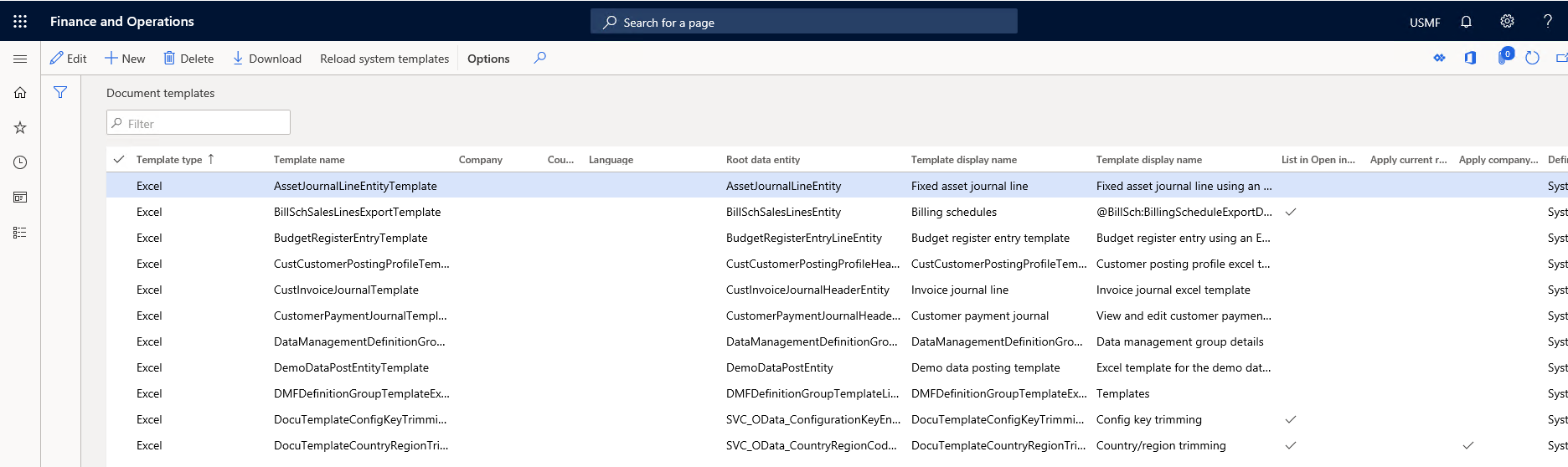
Detail of Documents template screen

Let's consider an example of a custom template scenario. A department would like to download or upload data via Excel but needs additional fields in the Excel document. They also need a logo added. You can edit an Excel template by downloading the original template, redesigning it as desired, and then uploading the template with the exact same file name back to the templates section.

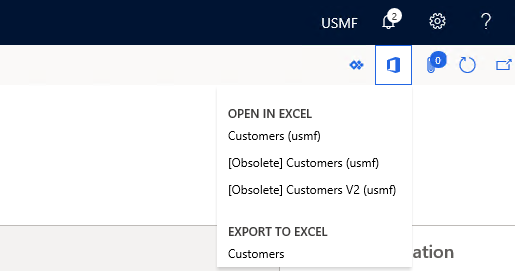
Microsoft Office button

Accessing the predefined entity template from a screen requires selecting Open Office in the navigation section.

Detail of Open in Microsoft Office button

Integrate with Excel

Now let’s examine the other ways you can integrate with Excel.

Excel workbook templates and designer

You integrate data via the dynamics data connector add-in for Word and Excel. You use the Excel integrator for journal entry uploads and for small data uploads to common entities.

Excel workbook designer

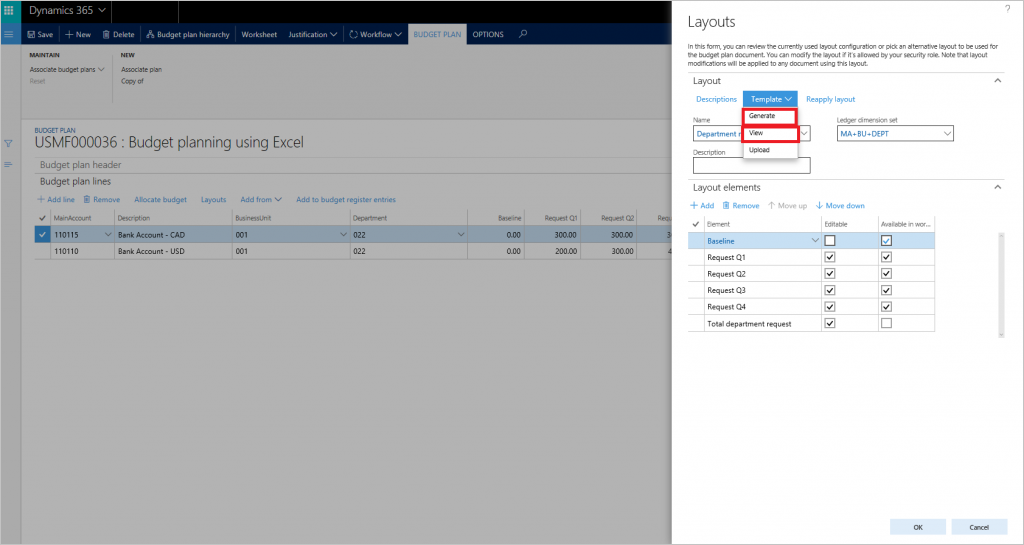
Finance and Operations apps have a simple-to-use interface to create Excel templates. It allows you to use data entities and the corresponding field definitions.

Excel Layouts selection menu UI

Finance and Operations apps display the associated templates based on the main entity displayed on the screen. For example, if you've displayed the all customers list page, the customer entity is the main and relevant entity. The drop-down list will display only customer-related templates.

Detail of Open in Microsoft Office button

Publishing data via Excel add-in

To ensure you publish valid data via the Excel add-in, any updates pass through the existing OData entity logic validation. This validation ensures data integrity and provides you with immediate feedback of relevant error messages if a data publish was unsuccessful.

Microsoft Outlook integration

Use the Outlook setup wizard to synchronize Outlook contacts, tasks, and appointments. The setup wizard will create and configure the relationship between a user, employee, and their Outlook account. It has parameters to configure the contact, task, and calendar integration. When complete, the system synchronizes the Finance and Operations apps and the user’s Outlook. For example, a newly created activity of type task will now show as a task in Outlook.

Embedded Power BI in workspaces

Dynamics 365 applications deliver interactive reports that integrate into application workspaces. Using rich infographics and visuals supported by Power BI, workspaces give you a highly visual, yet interactive experience. Using infographics in the overview page, you can get a quick glance of the state of the business.


Integration with third-party apps

When deciding on an integration pattern and technology, it's important to first understand the business need and requirements. Then can you translate the need to the proper technology. For instance, is real-time integration possible or will you require batch-based integrations for the data volumes?

Finance and operations apps allow for several patterns of integrations.

Open Data Protocol (OData)

OData is an open protocol. It allows the creation and consumption of queryable and interoperable RESTful APIs in a simple and standard way.

APIs specify the way you structure information passed across platforms so that applications can exchange data and information. Representational State Transfer (REST) is an API architectural style. A developer creates the API on the server and allows the client to talk to it. REST then decides what the API looks like.

OData allows the creation of REST-based web services. These services find resources using Uniform Resource Locators (URLs) and you define them in a data model. They publish and edit the web services by web clients using HTTP messages.

OData helps applications focus on business logic without worrying about the various API approaches to define request and response headers, status codes, payload formats, or query options. OData supplies guidance for tracking changes, defining functions or actions for reusable procedures, and sending asynchronous or batch requests.

 Note

OData has a limit of returning 10,000 records per call. To retrieve more data, you must implement pagination logic for integration scenarios.

We recommend that you use OData integration for low to medium volume data integration. It's an exceptional architecture choice for real-time integrations for small data sets.

Custom webservices

Finance and Operations apps support the development of custom webservices. You always expose custom webservices via a SOAP and a JavaScript Object Notation (JSON) endpoint. JSON support is a new feature in Dynamics 365 Finance and allows for the return data set to be in JSON format. We recommend this integration for real-time integration needs for small to mid-size data sets.

Data management package REST API

While OData works for small data sets, we recommend the data management package integration architecture for large data sets that don’t require real-time scheduling.

The package REST API lets you integrate by creating a request in Dynamics 365 Finance for a downloadable data package.

Business events

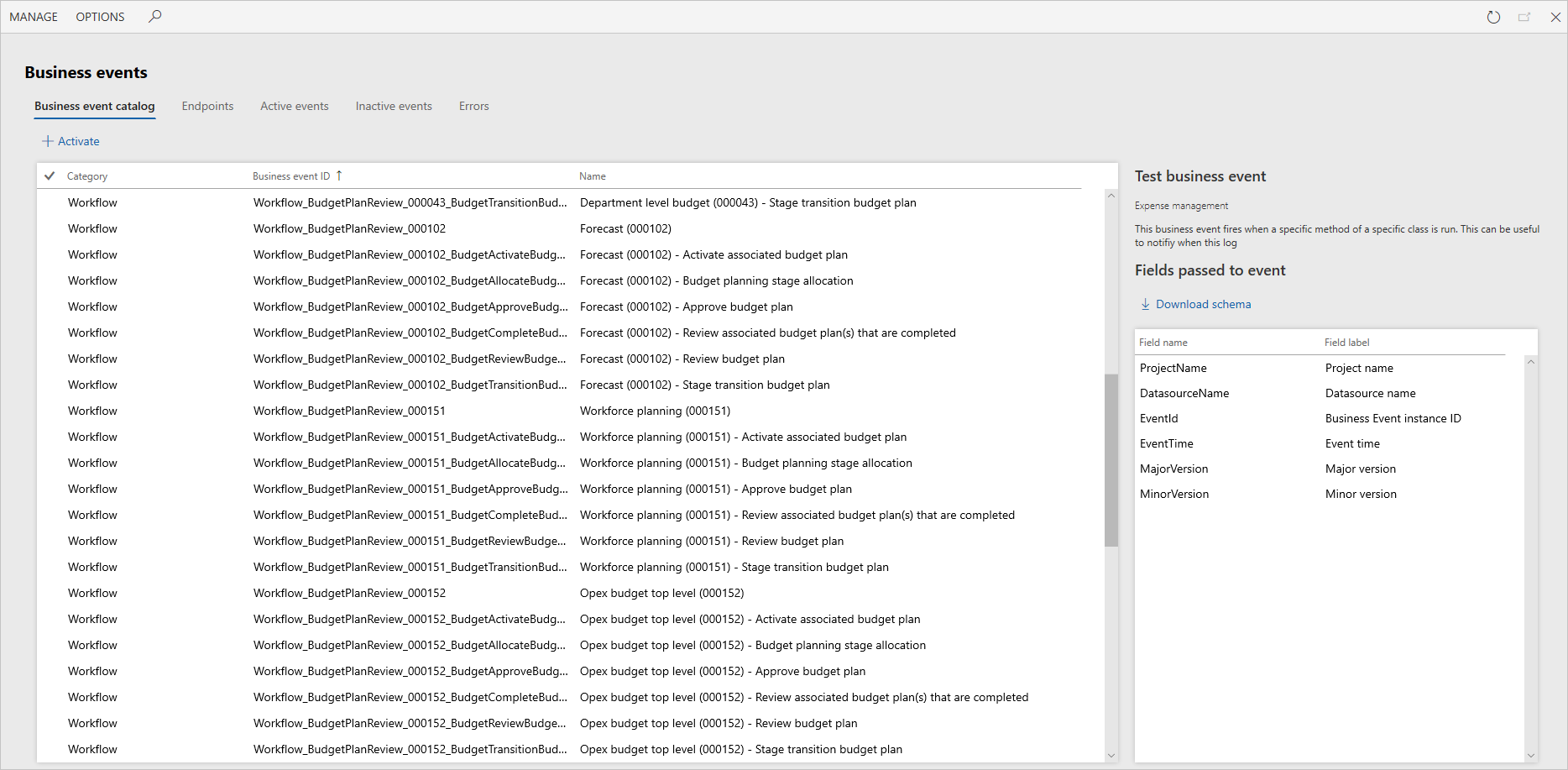
Business events are events generated in Finance and Operations apps and sent to an external system. The events are real time and they’re triggered as part of a larger business process. For example, you want to send a signal to your third-party warehouse system that a customer canceled a purchase order has. A developer can create a business event to send the signal upon cancelation.

You organize business events in the business event catalog.

Business events selection UI

To configure a business event, you must activate the event against an endpoint. To date, we support the following endpoints:

  • Azure Service Bus Queue
  • Azure Service Bus Topic
  • Azure Event Grid
  • Azure Event Hub
  • HTTPS
  • Microsoft Power Automate

We require the Azure-based endpoints to be in the customer’s Azure subscription and may incur added cost.

The business events screen also allows you to check any events that generate errors. It gives you the ability to resend those events.

The above content is taken from : https://docs.microsoft.com/

Saturday, 24 October 2015

AX 2012 SALES TRADE AGGREMENTS UPLOAD FROM EXCEL X++ CODE

AX 2012 SALES TRADE AGGREMENTS UPLOAD FROM EXCEL X++ CODE

        class VIK_SalesMaster_ExcelImport extends RunBaseBatch
        {
             DialogField                         dialogfile;
             FilenameOpen                        fileName;
             localmacro.CurrentList
              fileName
            endmacro
        }
     
       dialog
        protected Object dialog()
        {
            DialogRunbase  _dialog = super();
       
            _dialog.caption("Sales : Trade Aggrement Upload");
            dialogfile = _dialog.addField("FilenameOpen","Enter file path : ");
            dialogfile.value(fileName);
       
            return _dialog;
        }
     
       getFromDialog
        public boolean getFromDialog()
        {
            ;
            fileName = dialogfile.value();
            return true;
        }
     
       run
        public void run()
        {
            SysExcelApplication excel;
            SysExcelWorkbooks workbooks;
            SysExcelWorkbook workbook;
            SysExcelWorksheets worksheets;
            SysExcelWorksheet worksheet;
            SysExcelCells cells;
            COMVariantType type;
            int row =1;
            int _noofprints;
            CustName name;
            int i,j;
            //sales price upload
            str queryPricingMaster,itemId,existingItemIdsList,tempValue;
            ResultSet resultSet;
            InventTable inventTable;
            AifEntityKeyList                        keys;
            DD_HI_RRP_Staging                       RRPStaging;
            PricePriceDiscJournalService            PriceDiscSvc;
            PricePriceDiscJournal                   PriceDiscJour;
            PricePriceDiscJournal_PriceDiscAdmTrans PriceDiscJourAdmTrans;
            PricePriceDiscJournal_InventDim         PriceDiscJourDim;
            PriceDiscAdmTrans   _PriceDiscAdmTrans;
            //vikas
            PriceDiscAdmTable                   priceDiscAdmTable;
            PriceDiscAdmTrans                   PriceDiscAdmTrans;
            PriceDiscAdmName                    PriceDiscAdmName;
            PriceDiscJournalName                pricediscjournalName;
            NumberSeq journalNum;
            //sales price upload//
            str _relation,_accountcode,_accountselection,_itemcode,_temrelation,_unit,_curcode;
            real _from,_amtincur;
            date _todate,_fromdate;
            PriceType _pricetype;
            itemId tempItemId;
            AviFiles
            SysOperationProgress progress1 = new SysOperationProgress();
            ;
       
        //excel
        define.filename(fileName)
        excel = SysExcelApplication::construct();
        workbooks = excel.workbooks();
        try
        {
        workbooks.open(filename);
        }
        catch (Exception::Error)
        {
        throw error("File cannot be opened");
        }
       
       
                workbook = workbooks.item(1);
                worksheets = workbook.worksheets();
                worksheet = worksheets.itemFromNum(1);
                cells = worksheet.cells();
                type = cells.item(row+1, 1).value().variantType();
       
            //progress1.setCaption("Updation of pricing master is in progress…");
            //progress1.setAnimation(AviUpdate);


         ttsBegin;
       
            Select firstOnly  PriceDiscAdmName;
            priceDiscAdmTable.clear();
            priceDiscAdmTable.initFromPriceDiscAdmName(PriceDiscAdmName);
            journalNum      = NumberSeq::newGetNum(SalesParameters::numRefPriceDiscJournalNum());
            pricediscjournalName        =   journalNum.num();
            priceDiscAdmTable.JournalNum = pricediscjournalName;
            priceDiscAdmTable.insert();
       
           while (type != COMVariantType::VT_EMPTY)
        {
            row++;
            tempItemId  = cells.item(Row,5).value().bStr();
                // Set PriceDiscJourAdmTrans
                  while select forUpdate * from inventTable where inventTable.ItemId == tempItemId
                {
       
                   // progress1.setText(strfmt("Item ID  %1", tempItemId));
                    PriceDiscAdmTrans.clear();
                    PriceDiscAdmTrans.JournalNum        = pricediscjournalName;
                    PriceDiscAdmTrans.relation          = real2int(cells.item(Row,1).value().double()) ;//relation
                    PriceDiscAdmTrans.InventDimId       = "Allblank";
                    PriceDiscAdmTrans.DisregardLeadTime = NoYes::Yes;
                    PriceDiscAdmTrans.AccountCode       = real2int(cells.item(Row,2).value().double()) ; //account code
                    PriceDiscAdmTrans.AccountRelation   = cells.item(Row,3).value().bStr();     //account relation
                    PriceDiscAdmTrans.ItemCode          = real2int(cells.item(Row,4).value().double());
                    PriceDiscAdmTrans.ItemRelation      = cells.item(Row,5).value().bStr();         //item realtaion item id
                    PriceDiscAdmTrans.QuantityAmountFrom= cells.item(Row,6).value().double();        //from quantity
                    PriceDiscAdmTrans.UnitId            = cells.item(Row,7).value().bStr();            //unit id
                    PriceDiscAdmTrans.Amount            = cells.item(Row,8).value().double();         //Amount in Curr
                    PriceDiscAdmTrans.Currency          = cells.item(Row,9).value().bStr();        //currency code
                    PriceDiscAdmTrans.FromDate          = cells.item(Row,10).value().date();        //from date
                    PriceDiscAdmTrans.ToDate            = cells.item(Row,11).value().date();         //todate
                    PriceDiscAdmTrans.insert();
                    itemId=inventTable.ItemId;
       
                }
                 type = cells.item(row+1, 1).value().variantType();
        }
            ttsCommit;
        excel.quit();
        }
     
       main
        public static void main(Args _args)
        {
            VIK_SalesMaster_ExcelImport    VIK_SalesMaster_ExcelImport = new VIK_SalesMaster_ExcelImport();
       
       
             if(VIK_SalesMaster_ExcelImport.prompt())
                VIK_SalesMaster_ExcelImport.run();
        }
      

DYNAMICS AX 2012 : ITEM CATEGORY UPDATE FOR ITEMS

ITEM CATEGORY UPDATE FOR ITEMS
   
    METHODS
       classDeclaration
        class Vik_ItemCategory_ExcelImport exts RunBaseBatch
        {
             DialogField                         dialogfile;
             FilenameOpen                        fileName;
             localmacro.CurrentList
              fileName
            macro
        }
     
       createcategory
        Public void createcategory(Itemid _itemno,EcoResCategoryCommodityCode _CategoryName,EcoResCategoryHierarchyName _name)
        {
       
                 //vikas
            EcoResDistinctProduct  ecoResDistinctProduct;
            EcoResProduct           ecoResProduct;
            EcoResProductTranslation ecoResProductTranslation;
            EcoResProductCategory   ecoResProductCategory;
            EcoResCategory          ecoResCategory;
            EcoResCategoryHierarchy ecoResCategoryHierarchy;
            ecoResCategoryTranslation   ecoResCategoryTranslation;
            //vikas
             //Create Producr Category (Hierarchy)
            select ecoResDistinctProduct where ecoResDistinctProduct.DisplayProductNumber == _itemno;
            Select firstOnly ecoResCategoryHierarchy where ecoResCategoryHierarchy.Name == _name;
            Select firstonly ecoResProductCategory where ecoResProductCategory.Product == ecoResDistinctProduct.RecId;
            if (!ecoResProductCategory)
            {
                ttsBegin;
                ecoResProductCategory.clear();
                ecoResProductCategory.initValue();
                ecoResProductCategory.CategoryHierarchy         = ecoResCategoryHierarchy.RecId;
                select * from ecoResCategory where ecoResCategory.Name == _CategoryName;
                ecoResProductCategory.Category                  = ecoResCategory.RecId;
                //ecoResProductCategory.category = ecoResCategoryTranslation.RecId;
                ecoResProductCategory.Product                   = ecoResDistinctProduct.RecId;
                //ecoResProductCategory.VIK_EcoResProductType     = VIK_EcoResProductType::findByProductType(_productType).RecId;
                //ecoResProductCategory.VIK_EcoResSubCategory     = VIK_EcoResSubCategory::findBySubCategory(_subCategory).RecId;
                ecoResProductCategory.insert();
                ttsCommit;
                info(strFmt("category for item %1 is created",_itemno));
            }
       
        }
     
       dialog
        protected Object dialog()
        {
            DialogRunbase  _dialog = super();
       
            _dialog.caption("Product Upload");
            dialogfile = _dialog.addField("FilenameOpen","Enter file path : ");
            dialogfile.value(fileName);
       
            return _dialog;
        }
     
       getFromDialog
        public boolean getFromDialog()
        {
            ;
            fileName = dialogfile.value();
            return true;
        }
     
       run
        public void run()
        {
            SysExcelApplication excel;
            SysExcelWorkbooks workbooks;
            SysExcelWorkbook workbook;
            SysExcelWorksheets worksheets;
            SysExcelWorksheet worksheet;
            SysExcelCells cells;
            COMVariantType type;
            int row =1;
            int _noofprints;
            EcoResCategoryCommodityCode _CatName;
            EcoResCategoryHierarchyName _Hiername;
            CustName name;
            int i,j;
            //sales price upload
            str queryPricingMaster,itemId,existingItemIdsList,tempValue;
            ResultSet resultSet;
            InventTable inventTable;
       
            //vikas
            EcoResProduct           ecoResProduct;
            EcoResProductTranslation ecoResProductTranslation;
            EcoResProductCategory   ecoResProductCategory;
            EcoResCategory          ecoResCategory;
            EcoResCategoryHierarchy checkEcoResCatH;
            EcoResCategory          checkEcoResCat;
               //checkEcoResCatH                     = EcoResCategoryHierarchy::findByName(_Hiername);
            //checkEcoResCat                      = EcoResCategory::findByName(_CatName,checkEcoResCatH.RecId);
            //vikas
       
            //vikas
            //sales price upload//
            str _relation,_accountcode,_accountselection,_itemcode,_temrelation,_unit,_curcode;
            real _from,_amtincur;
            date _todate,_fromdate;
            PriceType _pricetype;
       
            itemId tempItemId;
            str stritemid;
            AviFiles
            SysOperationProgress progress1 = new SysOperationProgress();
            ;
        
        //excel
        define.filename(fileName)
        excel = SysExcelApplication::construct();
        workbooks = excel.workbooks();
        try
        {
        workbooks.open(fileName);
        }
        catch (Exception::Error)
        {
        throw error("File cannot be opened");
        }
       
       
                workbook = workbooks.item(1);
                worksheets = workbook.worksheets();
                worksheet = worksheets.itemFromNum(1);
                cells = worksheet.cells();
                type = cells.item(row+1, 1).value().variantType();
       
         ttsBegin;
       
           while (type != COMVariantType::VT_EMPTY)
        {
            row++;
            tempItemId  = cells.item(Row,1).value().bStr();
           // stritemid = cells.item(Row,1).value().bStr();
            select inventTable where inventTable.ItemId == tempItemId;
            if(inventTable)
            {
            select ecoResProduct where ecoResProduct.DisplayProductNumber == inventTable.ItemId;
            select ecoResProductCategory    where ecoResProductCategory.product == ecoResProduct.RecId;
       
            _CatName  = cells.item(Row,2).value().bStr();
            _Hiername = cells.item(Row,3).value().bStr();
       
            checkEcoResCatH                     = EcoResCategoryHierarchy::findByName(_Hiername);
            checkEcoResCat                      = EcoResCategory::findByName(_CatName,checkEcoResCatH.RecId);
       
            if(!ecoResProductCategory && ecoResProduct && checkEcoResCatH && checkEcoResCat)
                {
                    this.createcategory(tempItemId,_CatName,_Hiername);
                }
            else if (ecoResProductCategory && ecoResProduct && checkEcoResCatH && checkEcoResCat)
                {
                    this.updatecategory(tempItemId,_CatName,_Hiername);
                }
            }
                 type = cells.item(row+1, 1).value().variantType();
        }
            ttsCommit;
        excel.quit();
        }
     
       updatecategory
        Public void updatecategory(Itemid _itemno,EcoResCategoryCommodityCode _CategoryName,EcoResCategoryHierarchyName _name)
        {
       
                 //vikas
            EcoResDistinctProduct  ecoResDistinctProduct;
            EcoResProduct           ecoResProduct;
            EcoResProductTranslation ecoResProductTranslation;
            EcoResProductCategory   ecoResProductCategory;
            EcoResCategory          ecoResCategory;
            EcoResCategoryHierarchy ecoResCategoryHierarchy;
            ecoResCategoryTranslation   ecoResCategoryTranslation;
            //vikas
             //Create Producr Category (Hierarchy)
            select ecoResDistinctProduct where ecoResDistinctProduct.DisplayProductNumber == _itemno;
            Select firstOnly ecoResCategoryHierarchy where ecoResCategoryHierarchy.Name == _name;
       
            while select forupdate ecoResProductCategory where ecoResProductCategory.Product == ecoResDistinctProduct.RecId
            if(ecoResProductCategory)
            {
                ttsBegin;
                //ecoResProductCategory.clear();
                //ecoResProductCategory.initValue();
                ecoResProductCategory.CategoryHierarchy         = ecoResCategoryHierarchy.RecId;
                select * from ecoResCategory where ecoResCategory.Name == _CategoryName;
                ecoResProductCategory.Category                  = ecoResCategory.RecId;
                //ecoResProductCategory.category = ecoResCategoryTranslation.RecId;
                ecoResProductCategory.Product                   = ecoResDistinctProduct.RecId;
                //ecoResProductCategory.VIK_EcoResProductType     = VIK_EcoResProductType::findByProductType(_productType).RecId;
                //ecoResProductCategory.VIK_EcoResSubCategory     = VIK_EcoResSubCategory::findBySubCategory(_subCategory).RecId;
                ecoResProductCategory.update();
                ttsCommit;
                info(strFmt("category for item %1 is updated",_itemno));
            }
       
        }
     
       main
        public static void main(Args _args)
        {
            Vik_ItemCategory_ExcelImport    Vik_ItemCategory_ExcelImport = new Vik_ItemCategory_ExcelImport();
       
            if(curext() == "AHD")
            {
             if(Vik_ItemCategory_ExcelImport.prompt())
                Vik_ItemCategory_ExcelImport.run();
            }
        }
     
    METHODS
  CLASS


***Element: 

Blog Post 6: Bonus – Building Your First Custom Copilot Plugin in X++

Blog Post 6: Bonus – Building Your First Custom Copilot Plugin in X++  Introduction In our previous posts, we explored what Copilot can do o...