Showing posts with label D365 human resources. Show all posts

Saturday, 12 December 2020

Dynamics 365 Human Resources Benefits management

Benefits management overview

Dynamics 365 Human Resources helps you manage standard compensation activities, including defining fixed and variable compensation plans, and spot, cyclical, short-term, or annual bonuses. You can also manage long-term incentives, such as cash awards, stock awards, and stock options.

It provides a set of tools that you use to set up and maintain the benefits, deductions, and employees' compensation plans that you offer or processes for your employees.

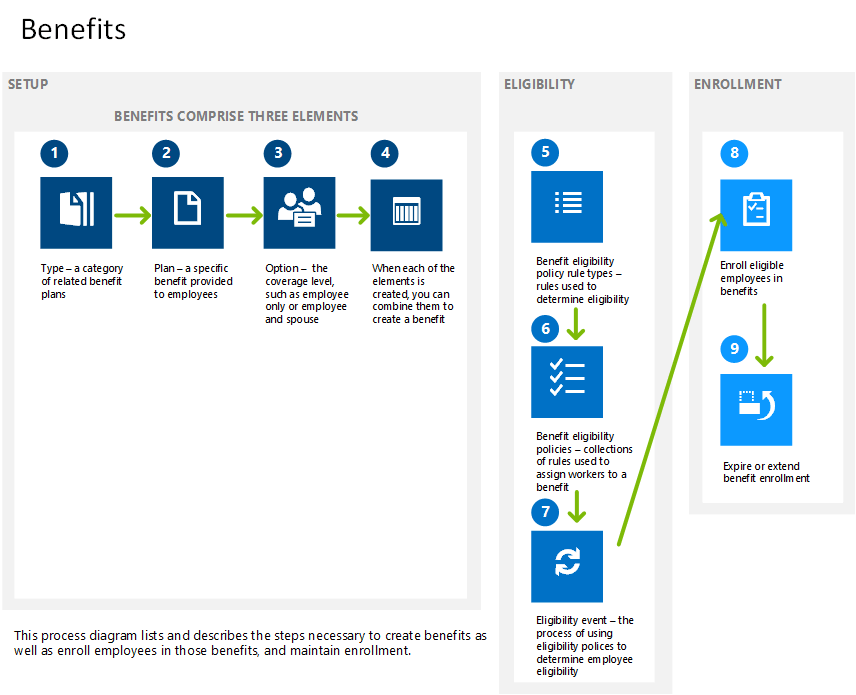
The following graphic shows the benefits management process flow.

benefits management process flow

You use compensation management to control the delivery of base pay and awards. An employee's fixed base pay and merit increases are controlled through fixed compensation plans. You control the payment of incentive pay, including:

  • Bonus payments
  • Performance awards
  • Stock options
  • Grants

You control one-time awards through variable compensation plans.

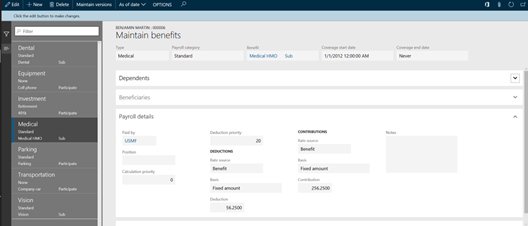
The following screenshot shows the benefits management screen.

screenshot of benefits management screen

You can set up plans to manage compensation effectively and equitably, and manage items, such as computers or phones, that you lend to your employees. You can create fixed and variable compensation plans and define rules that apply the compensation plan to meet the criteria for that plan.

In addition to compensating your staff with wages, salaries, and bonuses, you can develop benefit programs such as health insurance and retirement plans. You can also manage benefits such as loan programs, in which you lend items, such as computers or phones, to your employees.


The above content is taken from : https://docs.microsoft.com/

Employee self-service personnel management D365 HR

Employee self-service personnel management

With Dynamics 365 Human Resources, you can accelerate employee growth and communication. By centralizing employee data, and enabling self-service in a flexible and extensible platform, your employees will be in control of their own profile. Self-service lets you put the power in the hands of employees and their managers, while reducing paperwork and creating an agile, high-performance culture.

Employee self-service

Dynamics 365 Human Resources transforms employee experiences by:

  • Giving you rich employee profiles that include career accomplishments, skills, certifications, and interests.
  • Enabling employee self-service to let employees manage profile updates, training, performance-tracking, and time-off requests.
  • Allowing HR managers to analyze team performance to help optimize team impact and address any immediate concerns.

It helps employees get the information they need, all on their own, through easy-to-use self-service HR tools.

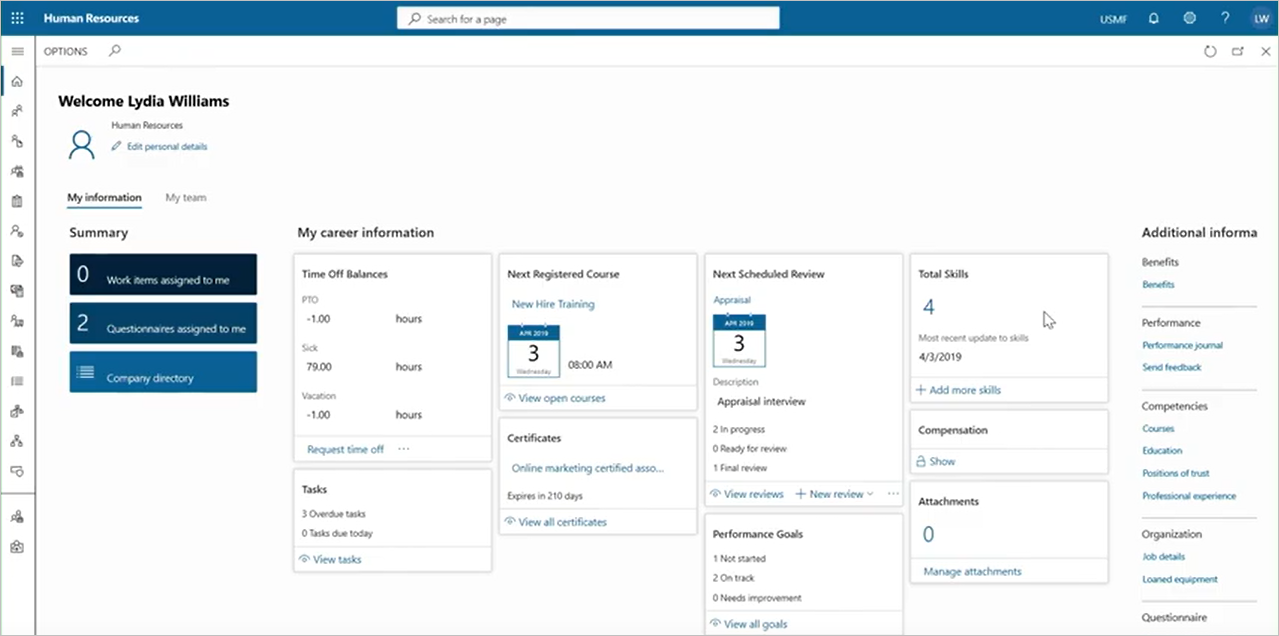
The following screenshot is the employee portal.

employee portal

In the self-service workspace, employees create universal profiles that highlight their skills and competencies.

Employees can self-register for the learning courses your HR staff created strategically. The key employee activities and achievements feed into the analytics that you use to measure success across individual, team, or organization-wide goals.

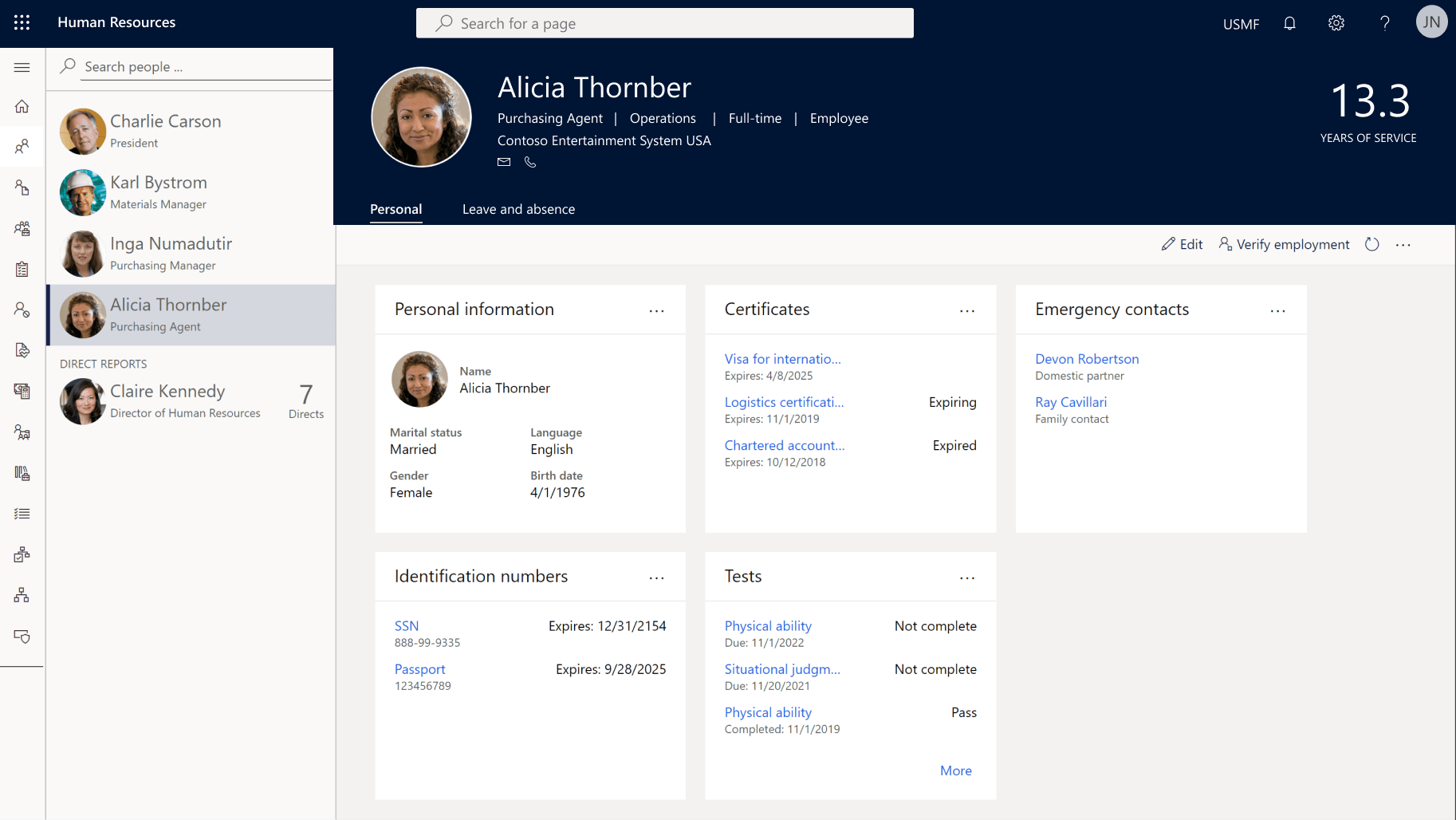
The following screenshot is the employee self-service workspace.

Screenshot of employee self-service workspace

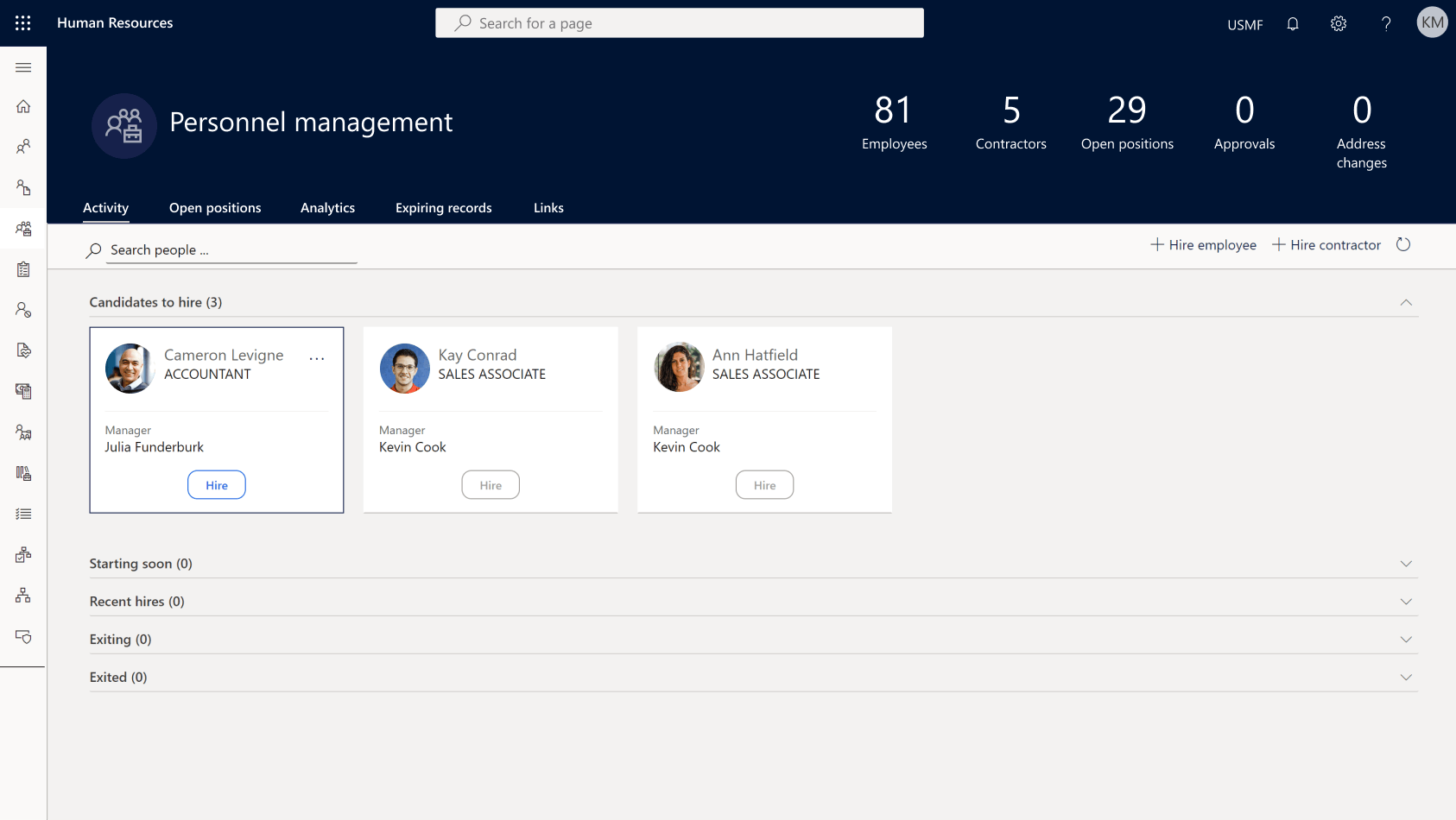
Personnel management

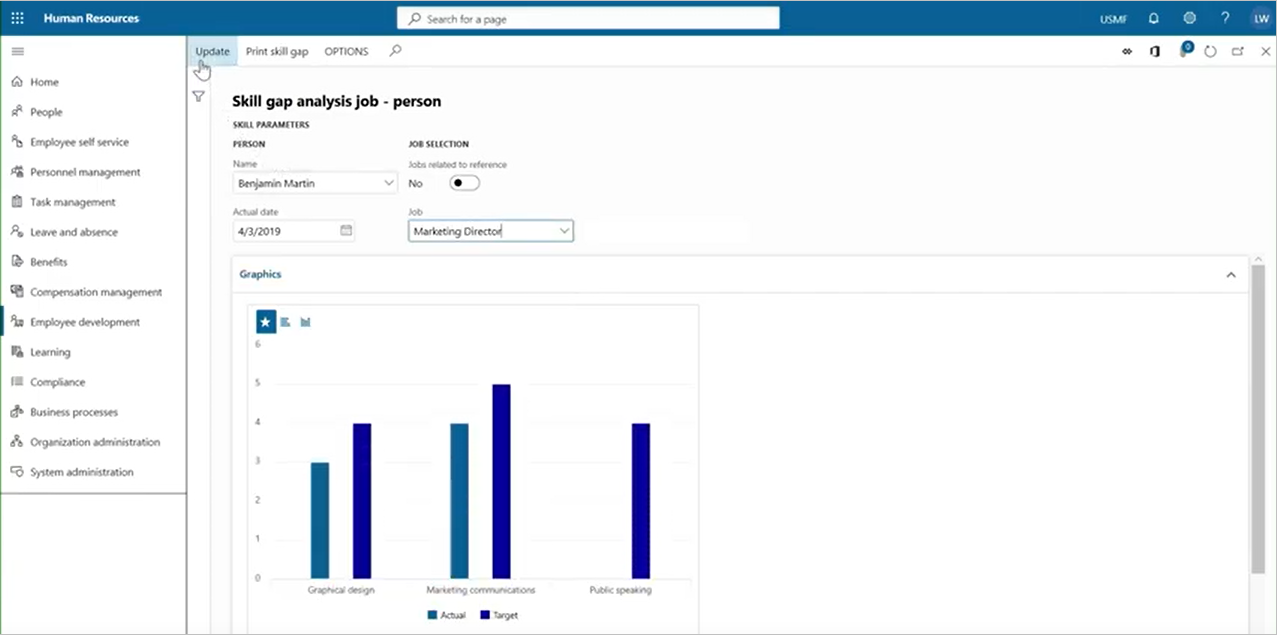
Skill gap analysis is a valuable tool for managers and employees alike. Both need to learn about the skills required for different roles in the organization.

The following screenshot shows the skill gap analysis screen.

skill gap analysis screen

You can find employees who possess the skills required for open roles, helping you fill vacancies from within quickly, learning and development across your entire organization.

The following screenshot shows the candidates screen.

Screenshot of the candidates screen

The leave and absence management feature offers a flexible framework for defining the absence management process. You can create leave and absence plans to determine how employees accrue or are granted time off. After employees enroll in a plan, they can submit time-off requests for approval by managers.

Leave tracking lets both first-level managers and HR managers see who is taking time-off, and how much time off each employee still has.

By centralizing employee data and enabling self-service in a flexible and extensible platform, your employees will be in control of their own profile.

The above content is taken from : https://docs.microsoft.com/

Dynamics 365 Human Resources Overview

Dynamics 365 Human Resources Overview

Dynamics 365 Human Resources helps you get the workforce insights you need to build data-driven employee experiences across the key HR functions, such as compensation, benefits, leave and absence, compliance, payroll, performance feedback, training and certification, and self-service programs. It connects people and operations data to ensure you can optimize workforce costs and take better care of your employees.

Dynamics 365 Human Resources streamlines routine human resources (HR) tasks and automates processes related to managing employees within your organization. It enables you to manage your personnel, compensation, benefits, leave and absence tracking, and competencies and development. Using them together, you set up your talent and organization for success. Dynamics 365 Human Resources also gives you a framework for your HR professionals to drive consistency, efficiency, and optimize processes.

Dynamics 365 Human Resources helps you drive better decisions by centralizing your workforce data and using embedded analytics to uncover valuable insights.
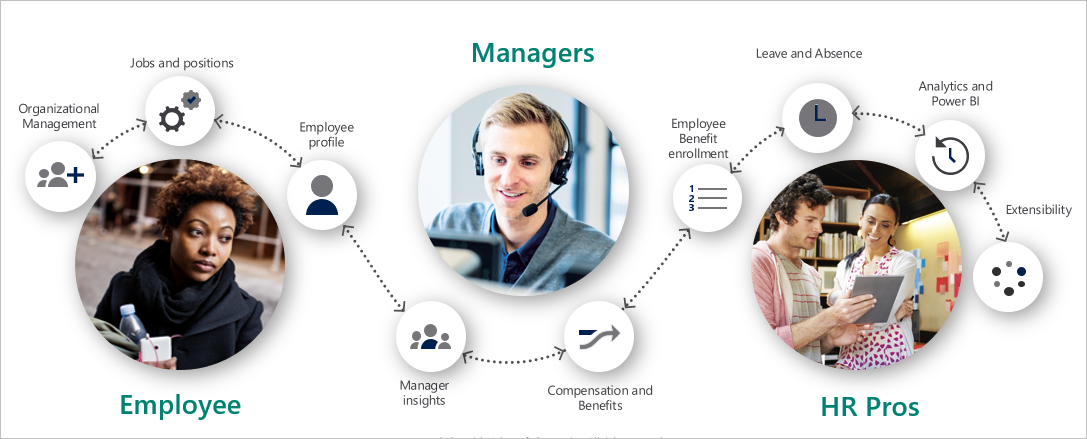
Graphic showing an overview of HR functions

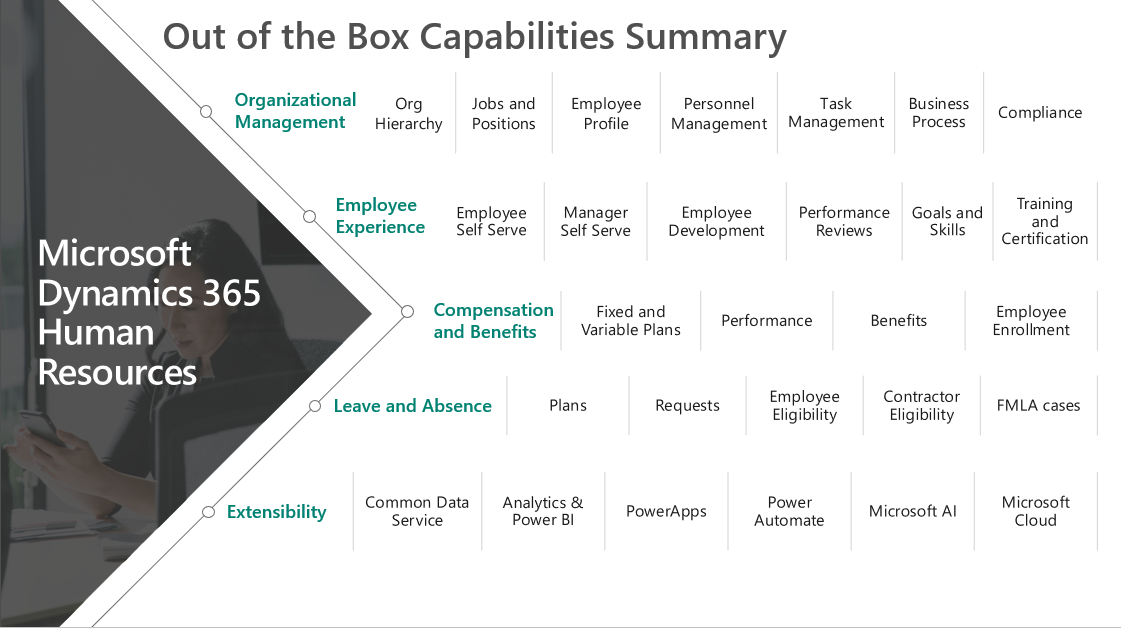
Dynamics 365 Human Resources allows you to manage human resources in a rich, browser-based user experience with workspaces tailored to specific roles.  

summary of HR out-of-the-box capabilities

You can use Dynamics 365 Human Resources to complete the following tasks:

  • Administer organizational structures.
  • Maintain comprehensive employee information from hire to retire.
  • Manage employee competencies.
  • Define and administer benefit plans, enroll employees, assign dependent coverage, and designate beneficiaries.
  • Establish and monitor absence policies.
  • Implement and track profile-based time management and generate pay information to export to a payroll system.
  • Review performance and implement employee goals.
  • Set up, deliver, and analyze training courses that include agendas, sessions, and tracks.
  • Track compliance (health and safety).
  • Manage employee development (standardized training, certifications, skills tracking, performance feedback).
  • Manage the employee and manager experience (self-service, manager dashboards, employee profiles).
  • Complete HR reporting with embedded dashboards and Power BI for workforce analytics.
  • Integrate payroll through Ceridian Dayforce.

Organization management

You can structure your organization using elements such as departments, jobs, and positions. These elements are among the foundational elements that you'll configure. You assign individual employees to positions, which in turn are associated with jobs.

Positions are an essential element of the lower level of an organization hierarchy. A position is an individual instance of a job. For example, the position sales manager—east is one of the positions that is associated with the job, sales manager. A position exists in a department and may have only one worker associated with it.

  • When you assign an employee to a position that reports to another position, you create a direct reporting relationship between the employees who are assigned to the two positions.
  • If your organization uses a matrix hierarchy, as a manager you can set up position hierarchy types and then add reporting relationships to positions for each hierarchy type that you set up.
  • Managers can transfer an employee for full-time employment or for contractual employment. The transfer can shift an employee to a different division, position, or change the employment terms like basic pay.

Mobile interface

You can deploy Dynamics 365 Human Resources on any device that a runs browser, making it accessible to a wide range of mobile and desktop devices. The mobile interface enables you to do business anywhere, anytime, on any device, by offering a user interface that is consistent across devices and form factors.

Task-based mobile apps

With cloud service’s support for mobility, you can:

  • Configure business processes with available apps.
  • Do more with your data using customized in-house apps.
  • Build native apps that focus on customer-facing needs.

Activity-based mobile applications enable you to keep your workforce productive on their mobile device while they are on the go. Your employees can complete commonly repeated tasks. For example, they can create and edit appointments, update opportunity list, update contact records, and process and approve expenses via the first-party mobile apps on their preferred mobile device, keeping your employees efficient while on the go.  

Benefits of Dynamics 365 Human Resources

Dynamics 365 Human Resources helps you to:

  • Increase employee retention by aligning people to affect and offering competitive compensation, benefits, and leave programs.
  • Reduce organizational complexity with administration that accurately reflects organization structures, hierarchies, personnel records, and job descriptions.
  • Improve productivity and efficiency with automated processes, workflows, and task management.
  • Personalize your solution through an intuitive and customizable interface that allows you to add or hide fields, change the layout, and share with others.
  • Customize and extend Dynamics 365 Human Resources using Microsoft Power Platform whatever of your level of technical ability.
  • Drive business performance with the security, privacy, and compliance delivered by human capital management built on Microsoft Azure.
  • Innovate business models to do local or remote point-of-sale from any device.
  • Innovate faster and easier with an integrated finance and operations solution that is adoptable to your business needs and allows you to grow at your pace.

Dynamics 365 Human Resources helps you manage and develop you employees, with everything from guided learning experiences to performance assessments. You can create streamlined talent-centric processes and effective programs that optimize workforce costs, deliver business impact, and drive an agile, high-performance culture. You can set up and manage all your HR programs. Dynamics 365 Human Resources gives you capabilities to better manage:

  • Personnel and organizational management.
  • Benefits and compensation.
  • Leave and absence management.
  • Compliance (health and safety).

With the HR experience in Dynamics 365 Human Resources, you can:

  • Create a 360-degree view of your employees that includes present and experience and data from Microsoft Office.
  • Create collaborative experiences across candidates, employees, managers, and HR to reduce administrative tasks and free up time for more strategic initiatives.
  • Build configurable processes that drive the right action, by the right employee, at the right time.
  • Simplify compliance to global regulations and safety and health requirements.

Dynamics 365 Human Resources capabilities simplify and optimize benefits, compensation, leave and absence, certifications and training, and compliance programs.

The above content is taken from : https://docs.microsoft.com/
Introduction to Dynamics 365 Human Resources

 Introduction to Dynamics 365 Human Resources

Hire, onboard, and retain people who can deliver results. Microsoft Dynamics 365 Human Resources gives your HR team and people managers the tools they need to land top candidates and accelerate their success.

The way we work—and the workplace—has fundamentally changed and yet, many organizations have not changed their HR processes. Today people are connected via mobile devices, plugged into their network, have high career expectations, and want to work for organizations with values that aligned to their values.

The HR manager's job is to ensure people can do their best work. The things that matter most for HR professionals are:

  • Allowing employees, managers, and leaders to do their best work.
  • Managing employee retention.
  • Building cost-effective and impactful HR programs.

Dynamics 365 Human Resources helps you move beyond traditional human resource management to take better care of your people and drive operational excellence.

As a complete solution, Dynamics 365 Human Resources maintains data, so you can generate reports that help you meet regulatory requirements.

In this module, you'll:

  • Discover the HR tools that help drive operational excellence.
  • Explore features and functionality of Dynamics 365 Human Resources.

With Dynamics 365 Human Resources, you can provide optimized core HR capabilities. Centralized data and the use of Microsoft’s leading business intelligence and artificial intelligence (AI) technology allows your HR team to get insightful people analytics.

We built Dynamics 365 Human Resources on the Microsoft Azure Cloud and Power Platform to deliver the extensibility, security, performance, and trust that you depend on. It helps you put your people at the center of the human resources digital transformation to optimize workforce costs, deliver business impact and drive an agile, high-performance culture.

Blog Post 6: Bonus – Building Your First Custom Copilot Plugin in X++

Blog Post 6: Bonus – Building Your First Custom Copilot Plugin in X++  Introduction In our previous posts, we explored what Copilot can do o...