Showing posts with label Dynamics 365 finance and operations. Show all posts

Friday, 18 December 2020

Security in data entities D365

Security and data entities

Data entities do not support the Extensible Data Security (XDS) concepts.

Entry points

Data entities support entry point security. This support resembles the support that menu items and pages have. To give you flexibility when you define a security model, data entities allow for a separate security configuration for each integration mode. Currently, two entry points/integration modes are identified for a data entity.

ENTRY POINTS
Entry pointDescription
Data servicesThe ability to use OData services (API) for the entity.
Data managementThe ability to use asynchronous integration options for the entity, such as import/export and connector integration.

Target scenarios

Data entities can support multiple categories of scenarios. Each category might have to be secured separately.

  • Data management (file-based import/export, and so on) – Typically, a data manager performs these scenarios. These scenarios might provide access to data that isn't usually accessible through the UI for the client. Therefore, you will often want to secure data management scenarios independently of access to the related page, so that a data manager can perform only import/export operations.
  • General integration via OData – Many integration scenarios require that data entities be exposed as services, so that data can be accessed via OData (for example, from an online storefront or a Process Lifetime Management [PLM] system). Often, you will want to control access to data entities that are built for this purpose independently of page access. In other words, you will want to grant access to the service interface without granting access through the client UI.
  • Microsoft Office integration (Edit in Excel, and so on) – Office integration scenarios also require that data entities be accessed via OData. However, from an end-user perspective, these scenarios can be viewed as a natural extension of the client, where, for example, Microsoft Excel is used to simplify some editing tasks. Therefore, there is usually no reason to secure the Microsoft Office integration independently of page access.

Privilege/duty mapping

Depending on the target scenarios for a data entity, you should create one or more new privileges, and extend existing duties. Alternatively, you can map the new privileges to duties that are created specifically for the target scenario. This approach helps guarantee that no user is granted more access than the user requires for the scenario.

The following table shows the privileges that you should create. It also explains how you should map these privileges to duties. If your data entity is intended to support more than one scenario, you should create the combined set of privileges and duty mappings.

PRIVILEGE/DUTY MAPPING
Target scenarioPrivilegesDuty mapping
The data entity is intended for data management.Create the following new privileges:
  • <DataEntity>Import
    • Grant=Create
    • IntegrationMode=DataManagement
  • <DataEntity>Export
    • Grant=Read
    • IntegrationMode=DataManagement
Extend the relevant data management duties with the new privileges. For more information, see the "Data administrator role" section later in this topic.
The data entity is intended for general integration via OData.Create the following new privileges:
  • <DataEntity>View
    • Grant=Read
    • IntegrationMode=DataServices
  • <DataEntity>Maintain
    • Grant=Delete
    • IntegrationMode=DataServices
Create new duties for the integration scenario, and map the relevant new privileges to these duties. For more information, see the "Duty naming guidelines" section later in this topic.
The data entity is intended for Microsoft Office integration.Create the following new privileges:
  • <DataEntity>View
    • Grant=Read
    • IntegrationMode=DataServices
  • <DataEntity>Maintain
    • Grant=Delete
    • IntegrationMode=DataServices
Extend the relevant existing duties that provide access to the related pages with the new privileges.

Because the approach that is described in the preceding table complies with the principle of least privilege, we recommend that you use it. Nevertheless, in some situations, you can use the following simpler approach. However, be aware that this approach might be less secure. It might also be slightly harder to maintain and extend.

PRIVILEGE/DUTY MAPPING
Target scenarioPrivilegesDuty mappingPotential issues
The data entity is intended for data management, general integration via OData, and Microsoft Office integration.Create the following new privileges:
  • <DataEntity>View
    • Grant=Read
    • IntegrationMode=All
  • <DataEntity>Maintain
    • Grant=Delete
    • IntegrationMode=All
  1. Extend the relevant data management duties with the new privileges.
  2. Create new duties for the integration scenario, and map the relevant new privileges to these duties.
  3. Extend the relevant existing duties that provide access to the related page with the new privileges.
When you use this approach, a data manager who is granted access to import/export data can also access the system from a web service. Likewise, a user who is granted access to the page that is associated with a data entity can also access the system from a web service. This user will be prevented from data import/export only if the user hasn't been granted the related data management duty.

Duty naming guidelines

When you create data entities for specific integration scenarios, you should also create separate duties. These duties grant the external application or service the required access to the data entities. The duties that you create should follow the same naming guidelines as the corresponding duties that provide access through the client UI. However, you should add a "using services" suffix.

DUTY NAMING GUIDELINES
Duty typeDuty object name suffixDuty name template
Enable…IntegrationEnableEnable … using services
Record…IntegrationMaintainMaintain … using services
Authorize…IntegrationApprove (Release, Confirm, Journalize)Approve (Release, Confirm, Journalize) … using services
Inquire…IntegrationInquireInquire into … using services

Here are some examples of duty names that follow these guidelines:

  • Maintain route master using service
  • Inquire into case progress using services

Data administrator role

The DataManagementApplicationAdministrator security role enables an associated user to have full import/export capabilities in the Data management workspace. This security role has two security duties for each of the five data entity categories that are assigned to it. One duty is for importing data via data entities of the associated category, and one for exporting data via data entities of the associated category. Therefore, a total of 10 security duties are assigned to this security role:

  • DataManagementApplicationDocumentEntitiesMaintain
  • DataManagementApplicationDocumentEntitiesView
  • DataManagementApplicationMasterEntitiesMaintain
  • DataManagementApplicationMasterEntitiesView
  • DataManagementApplicationParametersEntitiesMaintain
  • DataManagementApplicationParametersEntitiesView
  • DataManagementApplicationReferenceEntitiesMaintain
  • DataManagementApplicationReferenceEntitiesView
  • DataManagementApplicationTransactionEntitiesMaintain
  • DataManagementApplicationTransactionEntitiesView

When you create data entities that can be used in the Data management workspace, you must extend these duties with the new security privileges, based on the Entity Category property that is specified on the data entity. (For information about how to extend duties with the new security privileges, see the "Privilege/duty mapping" section earlier in this topic.) You can also use the duties to create new roles for specific data management scenarios.

Modeling new entry point security in the Application Explorer

The pattern for modeling security resembles the pattern for modeling security with privileges on an entry point. To model security, follow these steps.

  1. Create a new privilege.

  2. Create new data entity permissions.

  3. Set the Name to Data Entity.

  4. Select the Access Level.

  5. Select Integration Mode (All > Data Services > Data Management). This is specific to Object Type: Data Entity.

    • All – Applies same security settings to be applied to both OData and data import/export.
    • Data Management – Applies only to data import/export and connector integration.
    • Data Services – Only applies to OData Services.

RolebasedSecurity Security in data entities D365,entry point,previlege,duty,dynamics 365 finance and operations,

Sensitive data

The Table Protection Framework (TPF) enables strict access control to data that is stored in Finance and Operations. This feature is exposed through the AOSAuthorization property on tables and table fields. If you mark a table or field by using AOSAuthorization, the security framework now requires that a user be granted explicit access to that resource. This requirement also applies when the table or field is accessed through data entities. This section describes the guidelines for granting TPF permissions for data entities.

Data management

For data entities that are targeted at data migration, you should assign TPF permissions to the corresponding import/export privileges. In this way, you help guarantee that all data can be imported and exported.

Integration by using OData

For data entities that are targeted at integration scenarios, the TPF permissions that you should assign depend on whether the TPF-protected field is essential for the data entity as a whole to work:

  • If the TPF-protected field is essential: An essential field is a field that will always be read/written. In this case, TPF permissions should be granted to the same privileges that grant access to the data entity.
  • If the TPF-protected field isn't essential: Examples of nonessential fields include the field for a worker's Social Security number and the field for a vendor's bank account number. In this case, TPF permissions for accessing the field should be granted through a separate privilege, and that privilege should be assigned directly to the roles that require access to the TPF-protected field. However, if the field is a mapped field on the entity, that access has probably already been granted to the role, if that role also has access to the field through pages in the client UI.

There are several advantages to granting explicit access to TPF-protected fields that aren't considered essential for the entity:

  • You can more easily discover who has access to sensitive data.
  • You help reduce the risk that someone will gain access to sensitive data by accident, because a role gains access only if you assign both a duty and a privilege to it.
Above content is taken from https://docs.microsoft.com/

Thanks,
Vikas Mehta.

Friday, 11 December 2020

Security in Finance and Operations apps in Dynamics 365

Security in Finance and Operations apps

The Finance and Operations apps use a slightly different security model than the model-driven apps. These apps have an array of security and configuration options to:

  • Keep your sensitive data safe.
  • Keep users focused on their responsibilities.
  • Keep the system as streamlined as possible.

The Finance and Operations apps include: Dynamics 365 Finance, Dynamics 365 Commerce, Dynamics 365 Human Resources, and Dynamics 365 Supply Chain Management.

In these apps, individual security permissions combine into privileges, and privileges combine into duties. The administrator grants security roles access to the program by assigning duties and privileges to those roles.

Finance and Operations apps use context-based security to determine access to securable objects. When a privilege is associated with an entry point, you specify a level of access. The authorization subsystem detects the access at run time when users access an entry point. It applies the correct level of access to the securable object that the entry point leads to. This functionality ensures that you don't assign more permissions for a user than you need to.

Knowing how to implement different security options helps companies cover their security requirements. When you understand the security architecture, you can customize security to fit the requirements of your business easily.

You define a user’s experience with the collective settings of duties, privileges, permissions, authentication, and authorization.

Duties

‎Duties correspond to parts of a business process. The administrator assigns a duty to one or more security roles. Duties have privileges to do specific actions. For example, the maintain bank transactions duty has the generate deposit slips privilege and the cancel payments privilege.

You can assign both duties and privileges with security roles. However, we recommend that you use duties to grant access.

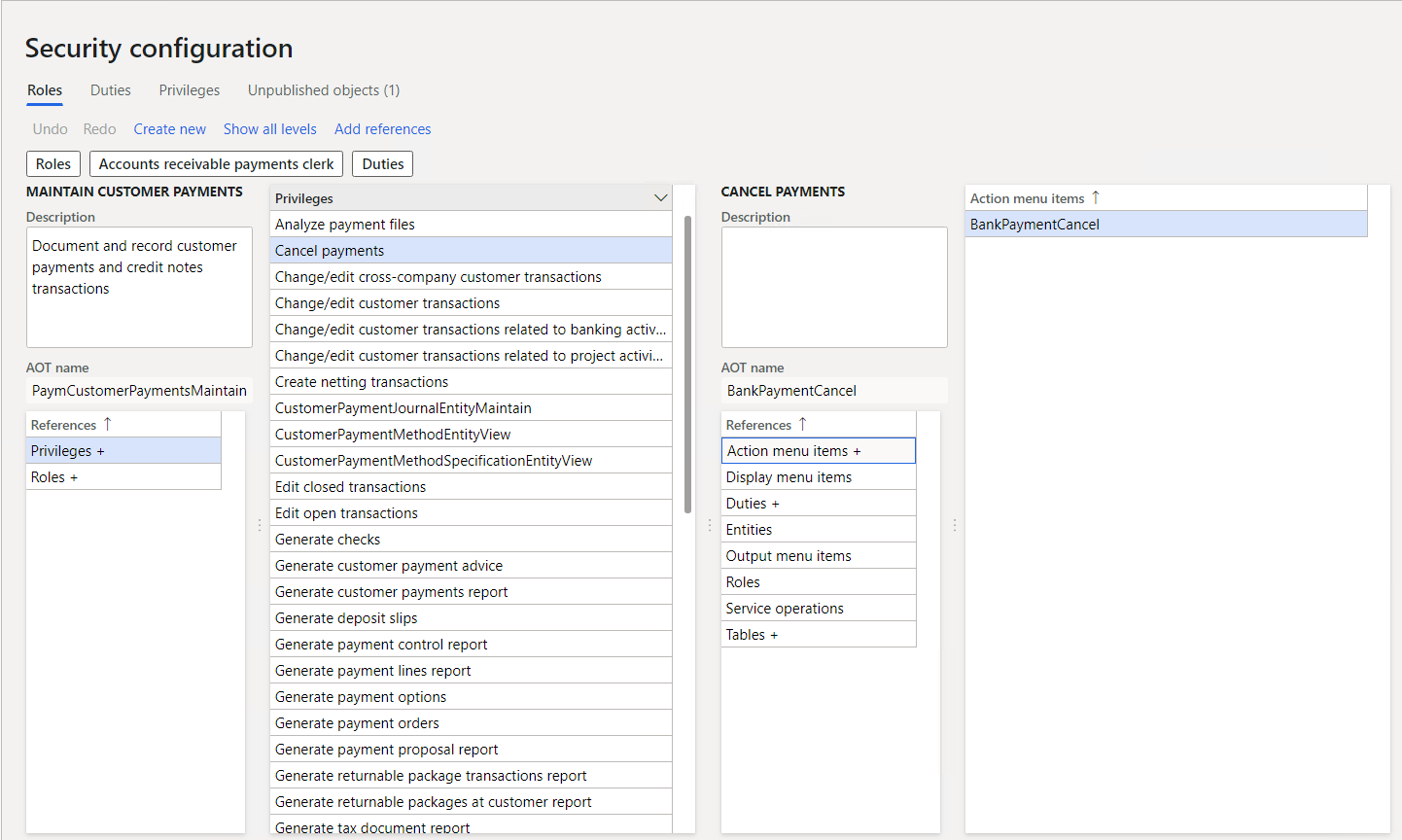
The following screenshot shows the security configuration screen for assigning duties to roles.

Security configuration, top-level UI

Privileges

‎A privilege specifies the level of access needed to do a job, solve a problem, or complete an assignment. It also has permissions to individual application objects, such as user interface elements and tables. For example, the cancel payments privilege has permissions to the menu items, fields, and tables that you need to cancel payments.

Apps provide privileges for all features by default. The administrator can change the permissions that are associated with a privilege or create new privileges.

You can assign privileges directly to roles. However, for easier maintenance, we recommend that you assign only duties to roles.

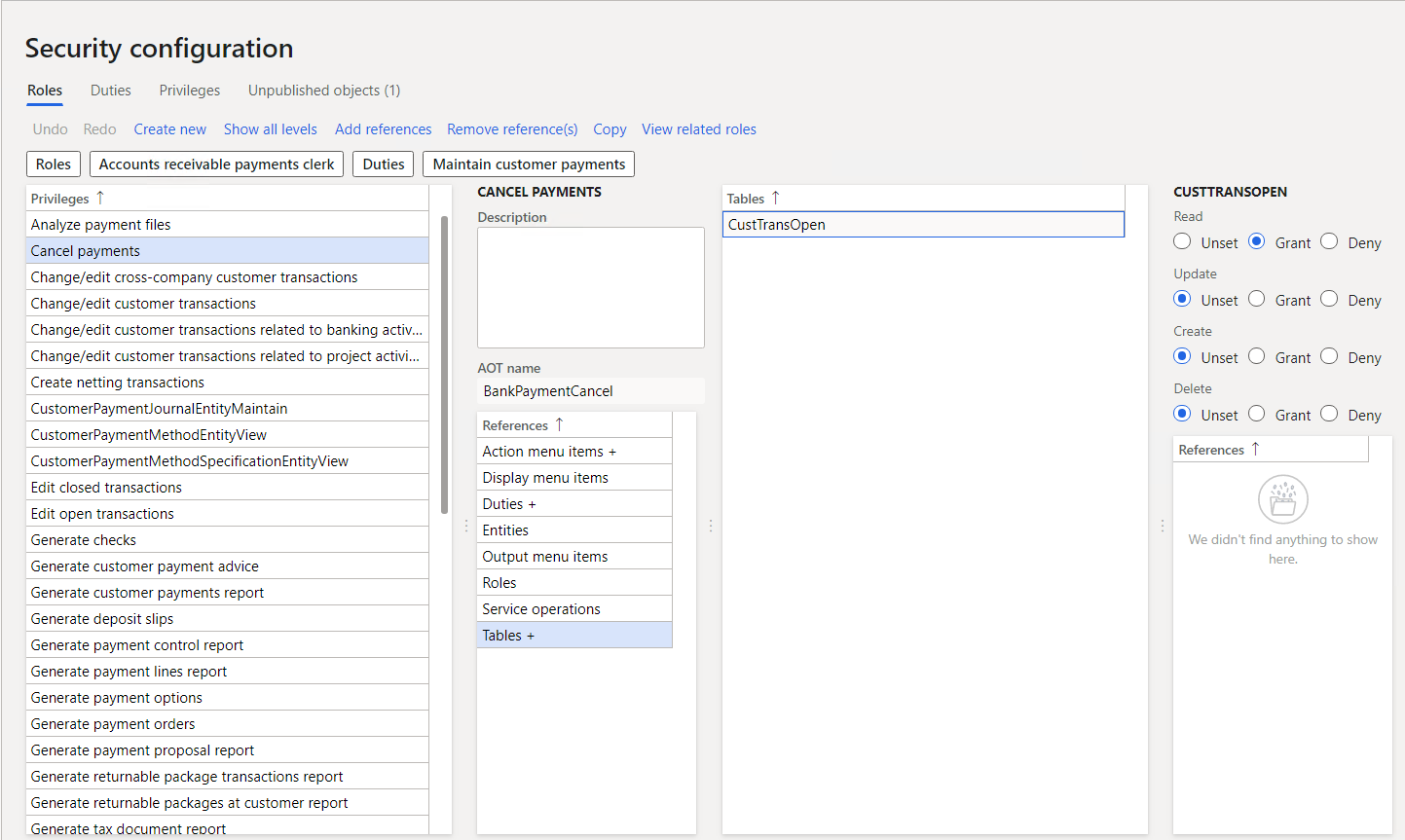
The following screenshot shows the security configuration screen for assigning privileges to roles.

Security configuration, Privilege UI

Permissions

‎Permissions give access to individual securable objects, such as menu items and tables. Privileges include permissions and represent access to tasks, such as posting a journal and processing credits and collections. Duties include privileges and represent parts of a business process, such as maintaining cash and bank transactions. You can assign both duties and privileges to roles to grant access.

You access each function in these applications, such as a form or a service, through an entry point. Menu items, web content items, and service operations are entry points.

The following screenshot shows the security configuration screens for assigning permissions to privileges.

security configuration, Permissions UI

Authorization

‎Authorization is the control of access to the app. Once you're authorized, security permissions control access to individual elements of the program including:

  • Menus and menu items.
  • Action and command buttons.
  • Reports.
  • Service operations.
  • Web URL menu items and web controls.
  • Fields in the Finance and Operations apps client.

The security model is hierarchical, and each element in the hierarchy is a different level of detail. Role-based security aligns with the structure of the business. You assign users to security roles based on their responsibilities and their participation in business processes. The administrator grants access to the duties that users in a role do, not to the program elements that users must use.

The following graphic shows the hierarchy of roles, duties, privileges, and permissions.

Graphic showing how about 100 roles are supported by 800 duties, 6,000 privileges, and 20,000 permissions.

Role-based security in Finance and Operations apps

In role-based security, access isn't granted to individual users, only to security roles. You assign users to roles. A user assigned to a security role gets access to the set of privileges that is associated with that role. A user who isn't assigned to any role has no privileges.

You must assign all users to at least one security role to have access to Finance and Operations apps. The security roles that you assign to a user determine the duties that the user can do and the parts of the user interface that the user can view.

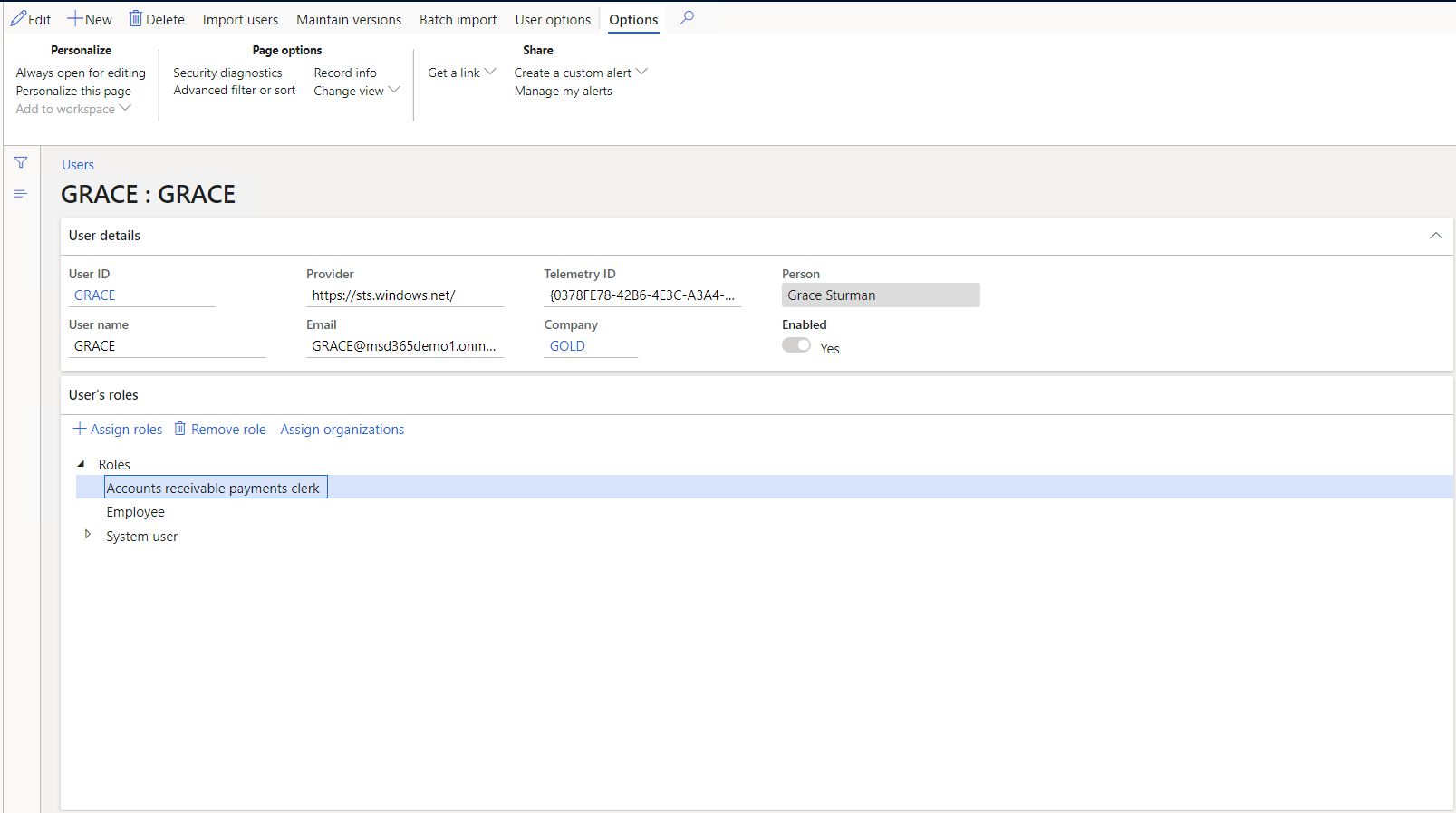
The following screenshot shows the security settings screen for a single user.

User settings UI

Because rules can be set up for automatic role assignment, the administrator doesn't have to be involved every time a user's responsibilities change. After security roles and rules have been set up, business managers can control day-to-day user access based on business data.

The apps have security roles by default. All functionality in Finance and Operations apps is associated with at least one of the default security roles. The administrator can assign users to the default security roles, modify the default security roles to fit the needs of the business, or create new security roles. The default roles aren't arranged in a hierarchy.

Segregation of duties

Different users might do specific tasks because of your security or policies. In Dynamics 365 Finance and Operations apps, you can set up rules to separate tasks that different users must do. This concept is segregation of duties. It reduces the risk of fraud and helps you detect errors or irregularities.

For example, you might not want the same person to acknowledge the receipt of goods and process payment to the vendor. You can also use segregation of duties to enforce internal control policies.

You can use segregation of duties to follow regulatory requirements, such as those from Sarbanes-Oxley (SOX), International Financial Reporting Standards (IFRS), and the United States Food and Drug Administration (FDA).

The apps have default duties. The administrator can change the privileges that are associated with a duty or create new duties.

The above content is taken from :  https://docs.microsoft.com/

Blog Post 6: Bonus – Building Your First Custom Copilot Plugin in X++

Blog Post 6: Bonus – Building Your First Custom Copilot Plugin in X++  Introduction In our previous posts, we explored what Copilot can do o...