Showing posts with label Dynamics 365 Sales contracts. Show all posts

Saturday, 12 December 2020

Customer feedback Dynamics 365 Customer Voice

Customer feedback experience with Dynamics 365 Customer Voice

Organizations grow their business by understanding who their customers are and what is important to them. This information helps ensure you're offering relevant solutions that provide value to your customers.

You can take advantage of Dynamics 365 Customer Voice with Dynamics 365 Sales to capture real-time customer sentiment and product trends. Customer Voice generates organizational insight from in-context data that you capture in surveys distributed to your customers.

With Customer Voice, you can develop customized, on-brand surveys that match your organization’s solutions and resources. As you create surveys to meet different customer use cases, AI gives you suggested questions based on the current content of the survey.

This capability can reduce the amount of time that it takes you to build a survey dramatically. You can incorporate sophisticated survey functionality like multilingual capabilities, advanced branching and skipping logic, or individualized survey links. The functionality ensures that you're capturing the most relevant information based on respondents’ answers and needs.

You can distribute surveys easily through email, QR codes, webpages, or embedded in applications. With Customer Voice, you can engage with respondents at the right time. You can send surveys based on predefined triggers such as a creating, updating, and closing a sales record.

You can personalize questions by taking advantage of integrated data from different customer relationship management (CRM), enterprise resource management (ERP), or human resources (HR) systems. You can review the survey results and responses in Office 365 or Dynamics 365 to get a comprehensive view of your customers.

Dynamics 365 Customer Voice introduces project management capabilities. A project contains multiple surveys that share common metrics and settings to simplify survey management.

  • On the Home tab, you can create a project, open recently accessed projects, and view satisfaction metrics. It provides a personalized experience, enabling you to collect customer feedback and get relevant insights quickly and easily, all in a few clicks. It also includes tips and tricks to help you get started and learn more about the application.
  • Use the Reports tab to view satisfaction metric dashboard and responses to your surveys.

With Customer Voice, you can create powerful survey solutions easily that help you:

  • Find sales prospects.
  • Help with lead qualification.
  • Measure customer satisfaction
  • Gain additional insight on future products and services to provide customers.

Customer Voice is a powerful, enterprise-grade feedback management solution that makes it easy for you to create simple, or sophisticated, surveys to gain real-time insights into your customers and organization. Creating and distributing targeted surveys based on real-time insights drives a deeper understanding of your customers. Who are they? What's important to them? What solutions should you be providing to them?

With Customer Voice, you can use the data captured from your customers to generate sales opportunities and better target the offerings to your customers. As a result, you and your organization can focus on what gives the most value and impact to your customers.


Dynamics 365 Sales Insights

Dynamics 365 Sales Insights

Dynamics 365 Sales Insights can accelerate your organization’s sales performance with real-time analytics based on historical data and predictive information. You find out what is and isn’t working with your sales calls using conversation intelligence. It transcribes and analyzes customer emotion, sentiment, conversation content, and speaking style automatically. Dynamics 365 Sales Insights helps discover what customers are responding well to, so you can replicate successful call strategies across your sales team.

Dynamics 365 Sales Insights increases conversion and win rates by using machine learning to prioritize leads and opportunities with the highest likelihood to convert and buy. You can also create procedures that minimize routine tasks and optimize email and phone interactions by identifying what your customers are thinking. With targeted insights and repeatable call strategies, you can not only increase the overall sales output of your sales team, but you can also ensure brand loyalty today and in the future.

Dynamics 365 Sales Insights uses AI to prioritize leads and opportunities with the highest likelihood to convert and buy increasing your win rates. You can also create procedures that minimize routine tasks and optimize email and phone interactions by identifying what your customers are thinking. With targeted insights and repeatable call strategies, you can not only increase the overall sales output of your sales team, but you can also ensure brand loyalty today and in the future.

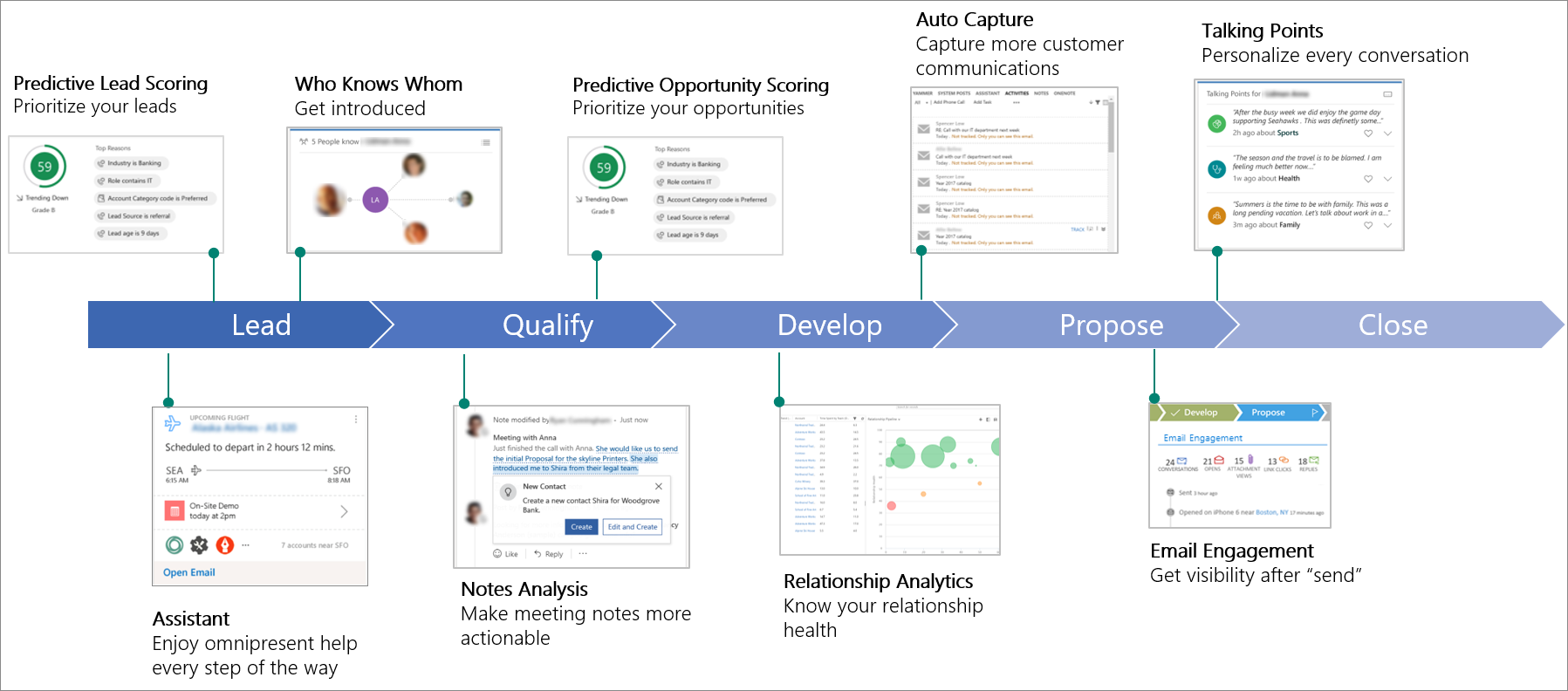
With Dynamics 365 Sales Insights, you can take advantage of AI throughout the entire sales lifecycle to get context-based insights on the current situation. The following image is an example of a sales lifecycle. During each phase, you can use relevant Dynamics 365 Sales Insights components to help your sales team.

sales lifecycle with Sales Insight components

Let’s examine some of the key components that are available including:

  • Assistant (free): The assistant feature combines and analyzes the information from Dynamics 365 Sales and generates action cards that are displayed in Dynamics 365 Sales on mobile devices and as a carousel or column in your web-based dashboard.
  • Auto capture (free): The auto capture feature analyzes your email messages in Microsoft Exchange to find all messages that might be relevant to your work in sales. It looks for messages to or from relevant email addresses and gives you the relevant messages in Dynamics 365.
  • Email engagement (free): The email engagement feature helps you create more effective email messages and learn how your contacts are interacting with them. Keep informed of your email and prioritize those prospects or customers that are most engaged.
  • Assistant with Studio (full capabilities): The assistant with studio feature has the assistant feature capabilities and enhanced features that allow you to create and display custom insight cards. You use Studio to create the custom insight cards through Microsoft Flow. After you create the cards, you can configure prioritization and who can review the cards.
  • Relationship analytics: The relationship analytics feature gathers information from Dynamics 365 Sales for key performance indicators (KPIs) and activity histories. It displays the information in a graphical representation.
  • Predictive lead scoring: The predictive lead scoring feature helps you focus on revenue generation efforts by giving you a lead score based on past selling efforts. The score helps you prioritize your efforts on quality opportunities.
  • Notes analysis: The notes analysis feature monitors notes that you enter about meetings or discussions with your customers and it gives you intelligent suggestions.
  • Talking points: The talking points feature displays topics that you can use to start a conversation with your customer such as sports, vacation, family, and entertainment.
  • Who knows whom: The who knows whom feature gives you details from your colleagues' emails, meetings, and engagements about potential leads that you're going to interact with. By having someone who can introduce you to leads, you're more likely to obtain a meeting with them.
  • Predictive opportunity scoring: The predictive opportunity scoring feature helps you to focus on revenue generation efforts by giving you a score to prioritize efforts on quality opportunities. Dynamics 365 Sales Insights analyzes details from previously won and lost opportunities to generate the scoring model.
  • Dynamics 365 assistant for Microsoft Teams: The Dynamics 365 assistant for Microsoft Teams feature gives you in-context and timely guidance across the sales lifecycle so that you can spend more time building relationships with your customers.

 Note

The Dynamics 365 assistant app for Microsoft Teams is currently in preview.

Dynamics 365 Sales Insights allows you to achieve more, onboard, coach, and motivate your sales team with fun team competitions that energize and engage everyone. Using Dynamics 365 Sales Insights, you can:

  • Increase sales performance.
  • Train your sales team faster.
  • Coach more effectively with AI-driven insights.
  • Help busy sales leaders proactively flag at-risk deals.
  • Gain visibility into conversations.
  • Give actionable feedback through built-in coaching tools.

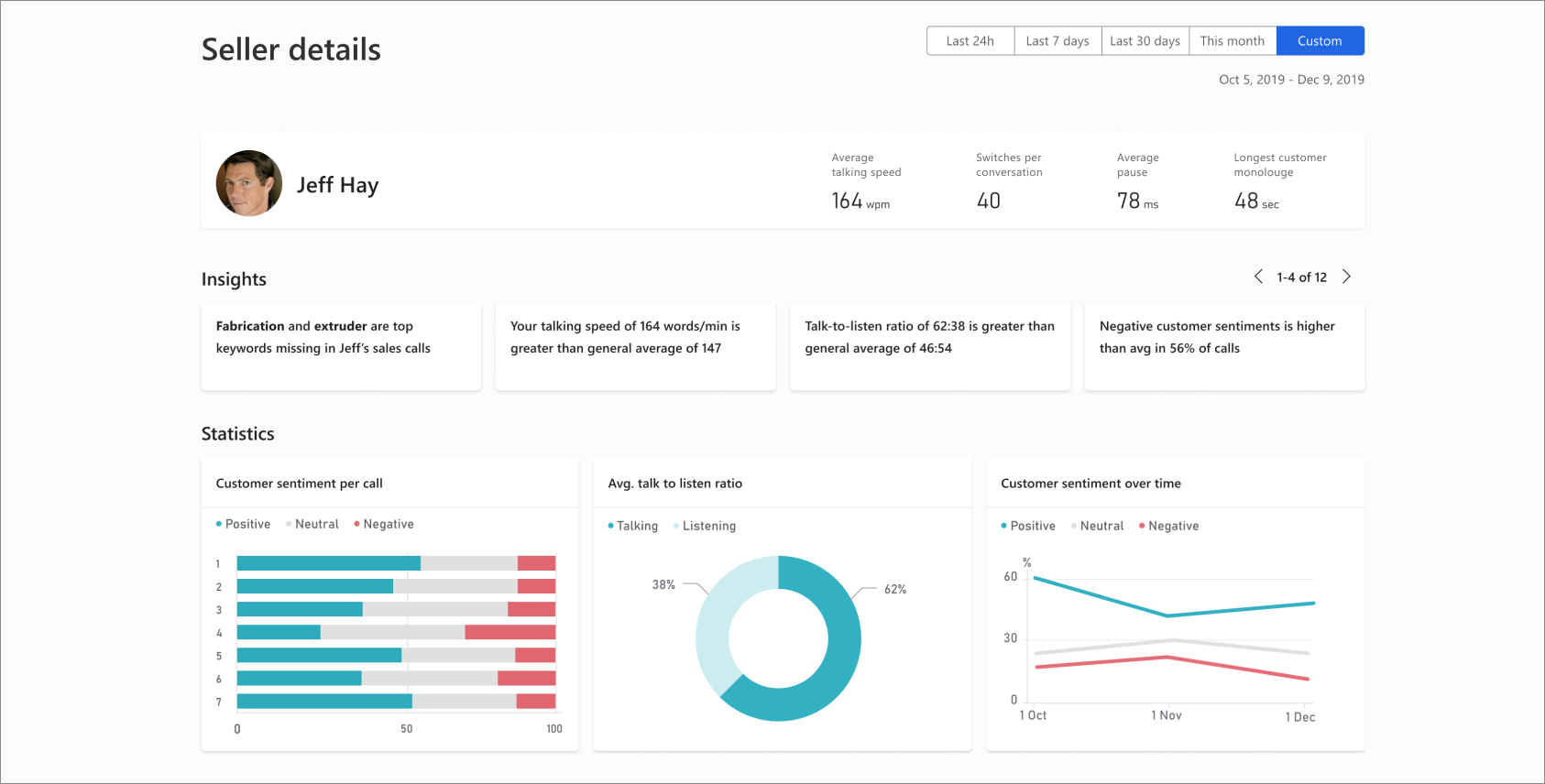
The following screenshot is the Dynamics 365 Sales Insights coaching tool.

Sales Insights coaching tool

The Dynamics 365 Sales Insights coaching tool can pinpoint emerging customer needs to help you grow your business. It helps you stay ahead of the market with insights derived from brand and competitor mentions. You can get answers in real time with natural language questions and answers based on sales and conversation data.

With Dynamics 365 Sales Insights, you can:

  • Help sales managers drive performance with pipeline analysis, deal insights, relationship analytics, and conversation intelligence.
  • Discover emerging customer needs, competitive dynamics, and market trends with AI-driven insights.
  • Find at-risk deals, gain visibility into conversations, and provide actionable feedback through built-in coaching tools.

Backed by artificial intelligence, Dynamics 365 Sales with Sales Insights equips you with tools to close more deals and maintain a long healthy relationship with your customers. It gives you the right information at the right time such as reminders, recommendations, and next step suggestions.

Sales Insights application

We designed this application to help you keep track of your daily work. The Dynamics 365 Sales Insights application delivers AI driven insights from your customer. To achieve the insights, it gives you information through key performance indicators (KPIs) for pipeline and deals and intelligent call data KPIs through conversations intelligence.

The Dynamics 365 Sales Insights features and coupled with data and insights from Dynamics 365 and Office 365, help you manage intelligently, answer you most important business questions quickly, and make strategic sales decisions.

 Note

You must buy a Dynamics 365 Sales Insights license to use Dynamics 365 Sales Insights features.

The Dynamics 365 Sales Insights application has predictive insights to help you guide your business and your team towards success.

With Dynamics 365 Sales Insights, you can:

  • Learn about trending topics, competitive trends, and brand mentions. Dynamics 365 Sales Insights bases the insights on what customers are talking about on sales calls. The insights help you launch sales trainings or design new sales motions for your organization.
  • Review unique behavioral patterns of the top sellers and bring those best practices and learnings to the rest of your team. You can also track important deals that need attention and guide your sales team to bring those deals to a healthy state.
  • Review KPIs understand the current state of the business quickly.
  • Find which team members need guidance by reviewing insights in the Teams overview page.
  • Personalize your coaching for team members by reviewing the customer sentiments and the conversation style of team members to maximize success.
  • Drill down into an individual team member to get a quick view of the specific team member. You can also review high-level insights and sentiments across each conversation, drill further into a specific conversation, review the transcript of the conversation, and then leave coaching comments to provide assistance. It gives you an easy and efficient way to close the coaching loop. It allows your team members to review the comments left by coaches or sales managers.
  • Review related opportunities for a conversation in context without switching applications. You can ask the system for additional information about your sales data using natural conversational language, such as, "What is the quality of our leads?" It gives you a visualization of the answer. Suggested questions help you uncover trends and drive better performance.
The above content is taken from :  https://docs.microsoft.com/

MRSS Dynamics 365 Sales Microsoft sales solution

Benefits of Microsoft Relationship Sales Solution (MRSS)

In a digital sales environment, it's important for you to reduce distractions and stay on top of your priorities. Relationships have always been key to winning in sales. In the past, you focused on knowing the customer and building authentic one-on-one relationships. Problems arise when there are disparate systems that you must navigate to get the information and insights you need to build strong relationships.

When crucial data about relationships and accounts is in silos—CRM systems, social networks like LinkedIn, and productivity and email systems—it’s impossible to obtain meaningful and actionable insights for establishing and keeping strong customer relationships. You are overwhelmed with too much information and not enough insight.

You understand the unique needs of your customer and focus on maintaining a high level of engagement with the buyer throughout the sales process.

With the introduction of technology, organizations have experienced significant increases in productivity. In the pursuit of productivity, you have become removed from customers. Over time, you have shifted away from building relationships to executing transactions, at a time when customers expect more authentic and personal interactions. Always plugged in to mobile devices and social media, customers are more informed and have more power and influence. It’s no wonder customers today are more demanding, have higher expectations, and are less satisfied with the sales experience.

With Dynamics 365 Sales, organizations can move beyond disconnected data to gain real, measurable business value including:

  • Data: Realizing business value begins by breaking down data silos to create unified and complete relationship data across Dynamics 365, LinkedIn, and Office.
  • AI: You can employ powerful and prebuilt AI with Dynamics 365 to derive value from the unified relationship data. You can even adapt the AI for your specific needs.
  • Insights: The AI augments your ability to prospect and engage by finding the highest potential prospects and opportunities and specific actions to move relationships forward. Dynamics 365 Sales can also automate time-consuming, repetitive admin work to free up your time. In addition, performance insights allow managers to deliver proactive and data-driven coaching and decision making.
  • Business value: Sales teams can exceed customer expectations and increase sales revenue and profitably. With Dynamics 365, you finally have the insights to make measurable gains such as shorter time to quota and higher conversions, all while increasing sales productivity.

We designed Microsoft Relationship Sales Solution (MRSS) to help you stay focused on making smart moves toward building more business. MRSS combines the intuitive ease-of-use of Dynamics 365 Sales with LinkedIn Sales Navigator. It's infused with embedded intelligence to give you personalized information at the right time, with built-in predictive lead scoring.

MRSS allows you to see holes in the sales pipeline, understand which leads might be primed to plug those holes, and which relationships might need a little nurturing. You can find and prioritize the leads that are most likely to convert to a sale easily. Once the needs are part of the sales pipeline, the relationship sales solution offers suggestions to guide the sales process.

Thanks to embedded intelligence, you get recommendations for the right type of interaction to further the relationship. Whether it's a call, an email, or reaching out through a trusted mutual connection, you get actionable insights that help you move deals forward.

It's all done seamlessly in the background, thanks to the connection between Dynamics 365 and Outlook. Outlook has LinkedIn integration. You can view LinkedIn profiles and other social data without leaving your inbox. The integration ensures you're talking to the right people at the right times.

With MRSS, you can avoid outside distractions and stay focused on finding and managing opportunities. You spend more time on building and maintaining relationships.

Dynamics 365 Sales makes it easier for you to build long-term relationships with your customers. By incorporating AI capabilities and integrating with common selling tools, you have a complete tool set that works with you across each stage of the selling process. You can use existing connections to help you connect with and qualify sales prospects faster, and better understand your customers and develop targeted sales content to engage with them.

LinkedIn Sales Navigator and MRSS

Microsoft combines Dynamics 365 Sales, Power BI apps, and LinkedIn Sales Navigator for you and your customers’ selling success.

This solution has many features and capabilities including:

  • Displaying LinkedIn information on existing leads and accounts in Dynamics 365 through the Sales Navigator widget.
  • Synchronizing between Sales Navigator and Dynamics 365 daily, so that leads, contacts, and accounts present in Dynamics 365 are visible within Sales Navigator.
  • Writing select Sales Navigator activities to Dynamics 365 with a single choice.

The LinkedIn Sales Navigator allows you to view LinkedIn information about leads, contacts, accounts, and opportunities. With unified relationship data, you get a view of relationships and can deliver the authentic and personalized engagement today’s customers demand.

Take advantage of the power of your network

With LinkedIn Sales Navigator and Dynamics 365, you can:

  • Find sales prospects: Locate and research potential sales prospects with Sales Navigator’s advanced search capabilities to gain a deeper understanding of the overall with details such as news headline information, recent activities, and job changes.
  • Facilitate introductions: Use icebreakers to find common connections between you and your prospect. Use those connections to facilitate introductions.
  • Connect with prospects: Get easy access to LinkedIn InMail and increase the probability of reaching your customer and create customized sales content through PointDrive. You can view detailed statistics, such as what information is being accessed, who is accessing it, and for how long.
  • Data validation: Keep the organizational structure of your matched leads up to date. Dynamics 365 Sales uses information from LinkedIn to validate the information on records and allows you to check on pending opportunities, or have a useful icebreaker when getting in touch with a lead.

By using both LinkedIn Sales Navigator and Dynamics 365 Sales together, you can find LinkedIn details such as news, common connections, and related records in Dynamics 365 records. It allows you to view member profiles directly in leads, contacts, accounts, and opportunities. You can also unify the relationship data and your processes, so you can build trust and manage relationships at scale easily.

You can build custom model-driven applications with LinkedIn Sales Navigator, enhancing business processes with data about people, organizations, and relationships.

The LinkedIn Sales Navigator integration allows you to display the contact's profile and the company profile. You can find mutual contacts, to improve introductions with leads, track interests, and post articles for customers. You can also review people within their company connected to your customers and find the best path to a warm introduction. Understanding related leads helps you map out stakeholders in the buying process.

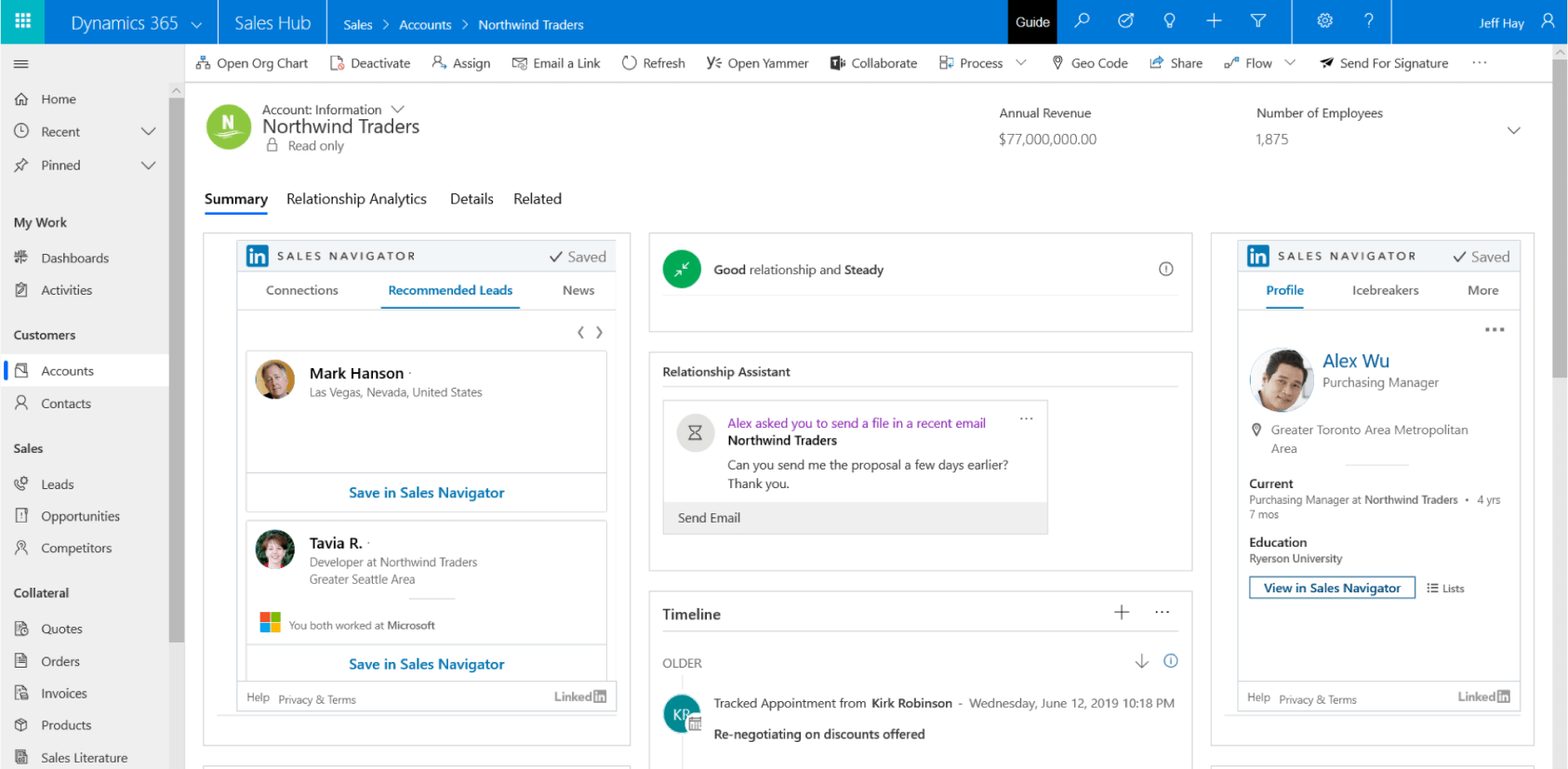
The following screenshot shows the integration between Dynamics 365 Sales and LinkedIn Sales Navigator.

integration between Dynamics 365 Sales and the LinkedIn Sales Navigator

The icebreaker function allows you to view common networks. This insight allows you to have the right information to take the correct step with customers.

LinkedIn Sales Navigator also lets you view recent activity and shared articles. The information helps you stay informed about your customers' interests to improve relations with them. It also allows you to assess prospective customers, find mutual connections, and assess their activity in Dynamics 365 Sales. The integration connects the system of record with the LinkedIn data graph and insights.

You can keep track of your customers and their needs. You can get real-time alert when customers change jobs, connect with someone in their network, or are mentioned in the news.

You also get recommend next best actions to build relationships with embedded insights based on the customer and their interaction with data from LinkedIn, Dynamics 365, and Office 365

By using Dynamics 365 Sales Insights, you ensure that you're building healthy relationships with customers by understanding how to engage with them to ensure that you're maximizing the overall impact of the communication.

With LinkedIn Sales Navigator, you can reduce the effort to manually track customers, and your connections on LinkedIn regularly fetch the information to ensure customer information is up to date.

The above content is taken from :  https://docs.microsoft.com/

Dynamics 365 Sales contracts

Sales contracts

Dynamics 365 Sales lets you create and deliver quotes to customers easily and turn those quotes into sales orders and invoices. It helps you build, quote, and deliver sales contracts that are the best fit for your customers.

You can integrate Dynamics 365 Sales with ERP applications including:

  • Dynamics 365 Finance
  • Dynamics 365 Supply Chain Management
  • Dynamics 365 Business Central.

This integration lets you use the sales management tools in Dynamics 365 Sales to manage the process you use to sell including:

  • Identifying what to sell.
  • Defining the details.
  • Managing the negotiation process.

You can use Dynamics 365 Sales to build and deliver sales contracts to your customers. You build sales quotes by using the integrated product catalog and contacting the right subject matter experts (SMEs) to help build the quotes. You can also take advantage of integrated collaboration tools such as Microsoft Teams. Creating a contract is simple, thanks to Dynamics 365 and its automated processes and real-time collaboration capabilities.

By taking advantage of Dynamics 365 Sales features, such as the product catalog, quotes, orders, and invoices, you can make creating, managing, and completing sales orders simple and repeatable. Dynamics 365 Sales finds products and services that meet the customer's needs at a sales opportunity level. You can use, change, or remove the product and services throughout the entire lifecycle of the deal. By using collaboration tools, you can create a workspace where internal resources, partners, and customers can work together to create the best solution for the customer. Once you've identified the best playbook, you can apply proven sales plays to increase the likelihood of winning the deal. By using Dynamics 365’s contract management capabilities, you can increase sales productivity and accelerate overall sales performance.

Sales playbooks

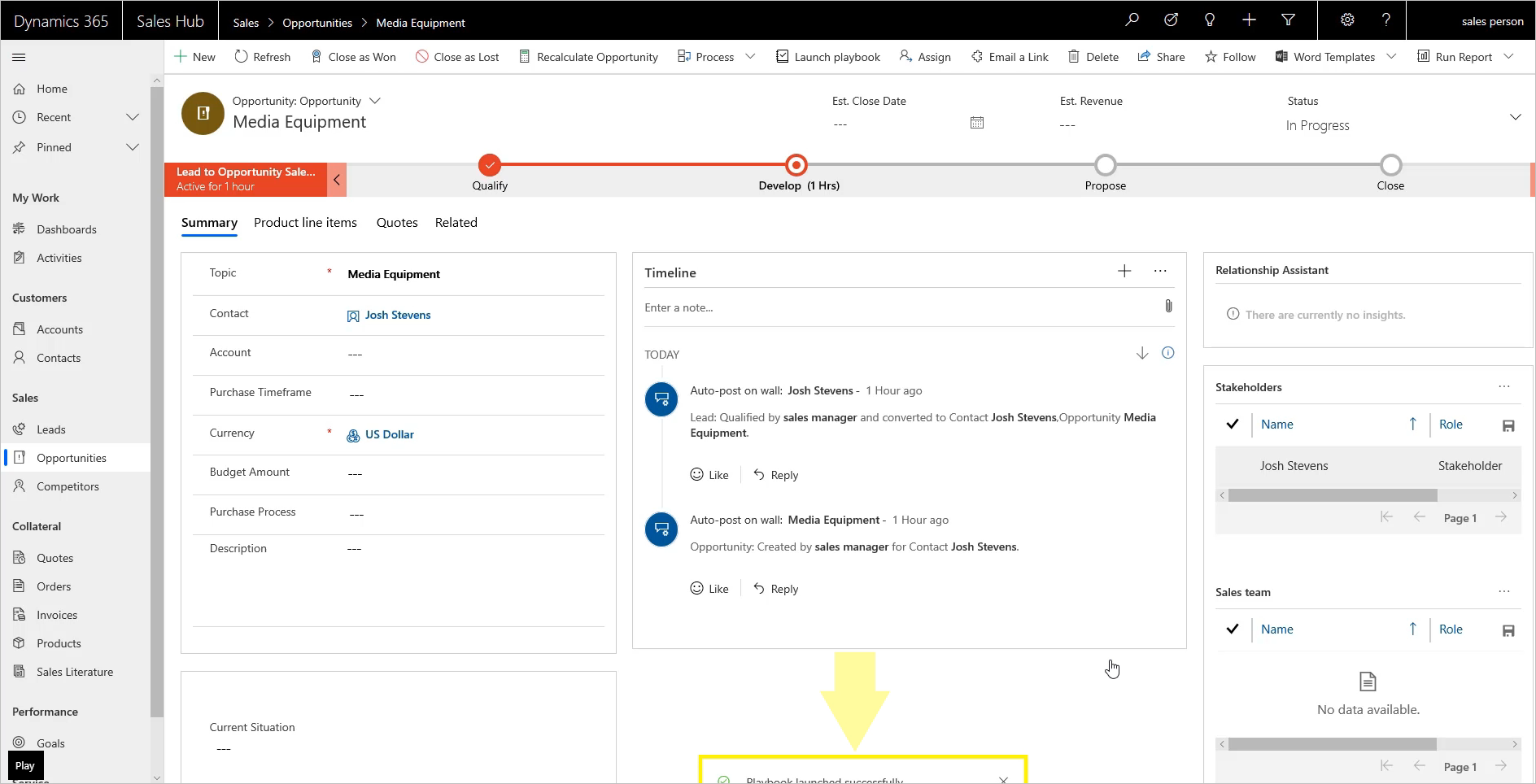
Playbooks in the Sales Hub app are a terrific way to automate repeatable processes and respond to external events. With playbooks, automation can trigger a play that creates a set of tasks and activities to remedy a situation.

Sales managers or users with a playbook administrator role can create playbook templates for common business scenarios. The templates use playbook categories to define the event or scenario. For example, the event could be the departure of a decision-maker from an organization. The playbook defines the organization’s response to that event. You can follow the organization’s and industry best practices in the form of playbook activities.

The following screenshot shows a playbook.

Screenshot of a sales playbook

Blog Post 6: Bonus – Building Your First Custom Copilot Plugin in X++

Blog Post 6: Bonus – Building Your First Custom Copilot Plugin in X++  Introduction In our previous posts, we explored what Copilot can do o...