Showing posts with label Dynamics 365 Finance. Show all posts

Saturday, 12 December 2020

Dynamics 365 Finance Credit and collections

Credit and collections

A common challenge for CFOs is predicting when customers will pay. Slow and inconsistent payments restrict cash flow and inhibit both long-term planning and daily performance. The credit and collections functionality in Dynamics 365 Finance predicts when customers will pay invoices, based on a multi-tiered historical analysis. These predictions help you get your receivables collected on time and reduce the cost and effort of manual collections management.

You can track and manage the complete lifecycle of credit and collections including:

  • Generating customer account statements.
  • 360-degree visibility of customer aging data and overdue balances.
  • Automating customer communication.
  • Finalizing write-offs.

You can better allocate funds and spot credit risks before large orders ship. You’re equipped with effective strategies to get paid in full and on time. You collect revenue faster because you process your money faster.

You manage accounts receivable collections information in one central view, using the Dynamics 365 Finance Manage customer credit and collection workspace. You use this central view to manage collections. Collections agents can begin the collection process from customer lists that you generate using predefined collection criteria.

The credit and collections workspace. You reviewed basic configuration, collection letters, write-offs and overall credit, and the collections and dispute process in the system.

Visibility to customers that don't pay invoices on-time is important to managing cash flow and receivables. The credit and collections module addresses the customer credit, collection, and write-off process. Dynamics 365 Finance ties these transactions back to the proper financial transactions to provide you with one central view.

Month, quarter, and year-end reviews

At the end of a fiscal year, you must generate closing transactions and prepare your accounts for the next fiscal year. You use the consolidation functionality to combine the financial results for several subsidiary legal entities into results for a single, consolidated organization. Prompt month end closing, and correct reporting are imperative for overall operational health of your organization.

Dynamics 365 Finance allows global businesses to do more with capabilities such as a shared chart of accounts across multiple legal entities and dashboards show a global view of your organization.

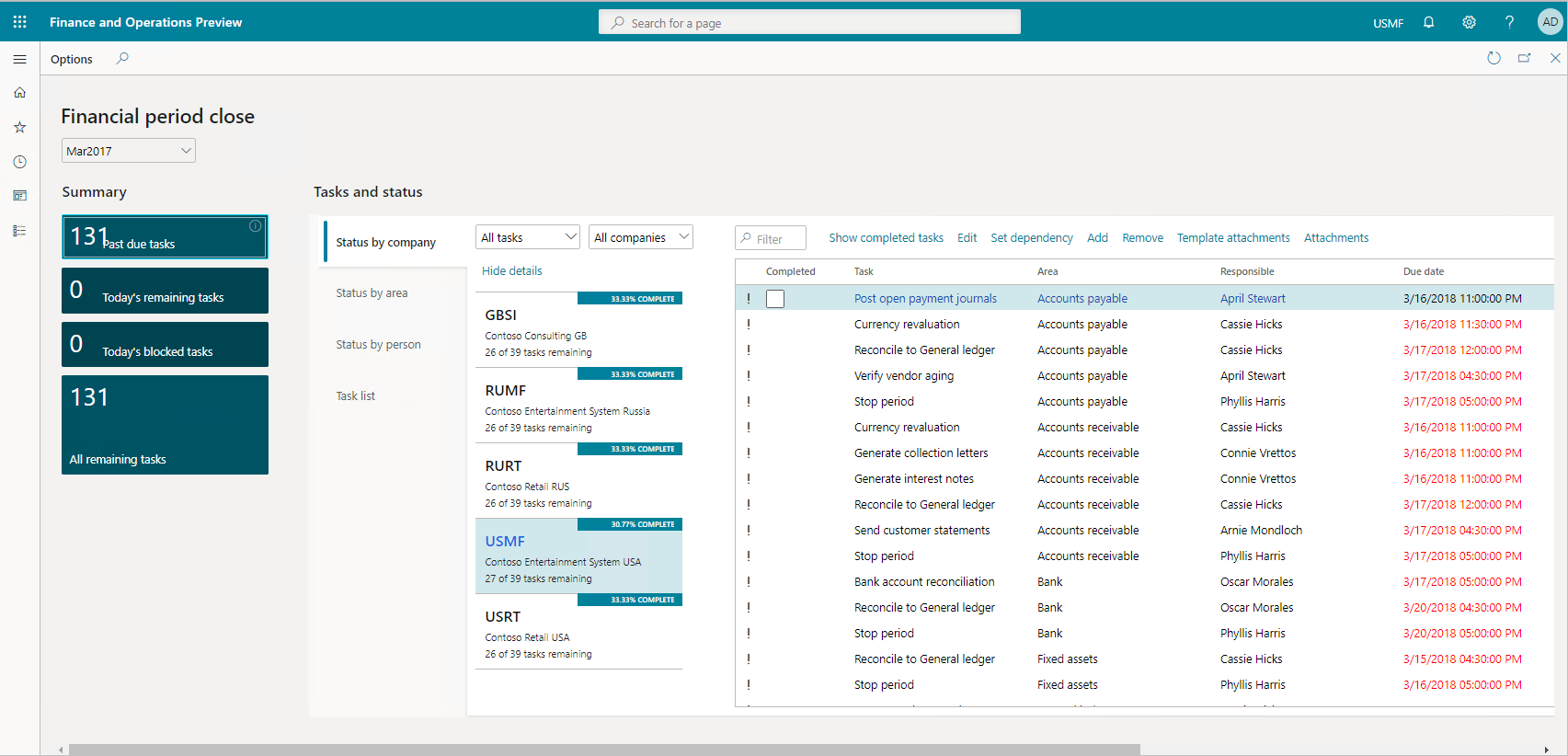
The financial period close workspace lets you track your financial closing processes across organizations, areas, and people. Depending on their view of the financial period close workspace, you'll see either all tasks and statuses for a closing schedule assigned to different employees, or just the tasks assigned to them.

financial period close workspace

With Dynamics 365 Finance, you can close the books faster and simplify global financial management with in-depth reporting capabilities, financial intelligence, and embedded real-time analytics. You can activate flexible and agile financial reporting that supports multiple legal entities and currencies in a single instance. That instance natively manages foreign exchange and shortens the end-of-month process.

You use the general ledger to complete closing procedures for a period or a year. Closing processes prepare the system for a new period. There are many tasks including preparing filings, inventory closing, consolidation, and more that you need to complete first.

To prepare the system for a new year, you must run the year-end close process. Each organization has different processes and steps for the end of a period.

As part of periodic tasks, you must complete the following tasks:

  • Bank reconciliations.
  • Configure financial period close.
  • Prepare periodic filings.
  • Run foreign currency revaluation processes.
  • Perform financial consolidations.
  • Process end of year tax reporting.

Global attributes

Dynamics 365 Finance enables you to operate worldwide by supporting multiple currencies, language translations, jurisdictions, compliance regulations, and infinite dimensions.

In today’s global market, you might receive and send payments using different currencies. There are two types of currencies in Dynamics 365 Finance. The accounting currency is the main currency that you use. However, you'll need to report recorded financial transactions in different currency, called the reporting currency. You can repurpose a reporting currency and use it as a second accounting currency. You call using two accounting currencies dual currency.

With Dynamics 365 Finance, you can convert currencies and post transactions to currencies other than the one in which you completed the order. You can recognize jurisdiction and compliance based on locality, and the user interface displays different languages based on users’ personal settings.

If your organization has multiple legal entities and transacts in multiple currencies, then supporting currencies and their corresponding exchange rates is essential.

Allow you to conduct business in different regions, using simple user configuration setups for language translations.

Dynamics 365 Finance modules

Core product capabilities

Dynamics 365 Finance capabilities

General ledger

The general ledger module is the core of Dynamics 365 Finance. It's integrated with other subledgers in financial management, so each department can manage its own books (subledgers) without disrupting the general ledger. It provides you with a central location to organize and manage all your organization’s financial records. You use this account information to prepare your financial statements.

You use general ledger to define and manage the legal entity’s financial records. The general ledger is the register of debit and credit entries. You classify these entries using the accounts that are listed in a chart of accounts. You can adjust to changing financial requirements with a flexible, guided, rules-based chart of accounts, financial dimensions, and global tax engine. You can track values efficiently and reduce reporting errors with centralized, automated processes for managing your capitalized assets from acquisition through disposal.

Incorporating a shared chart of accounts across legal entities enables organizations to streamline main reporting and the intercompany and consolidations business processes.

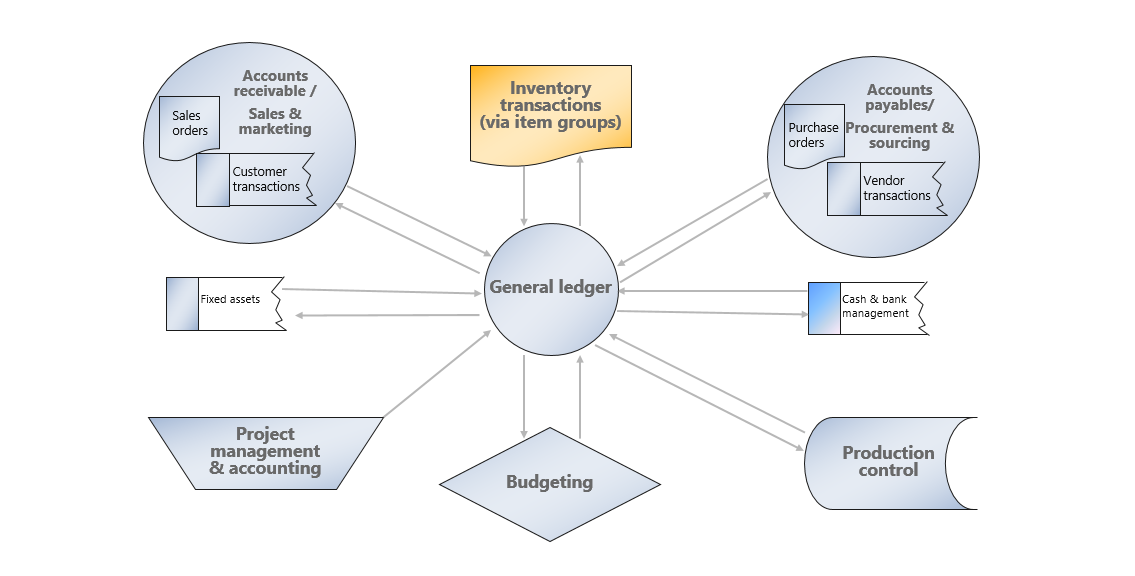
The following figure illustrates the typical General ledger processes of a business:
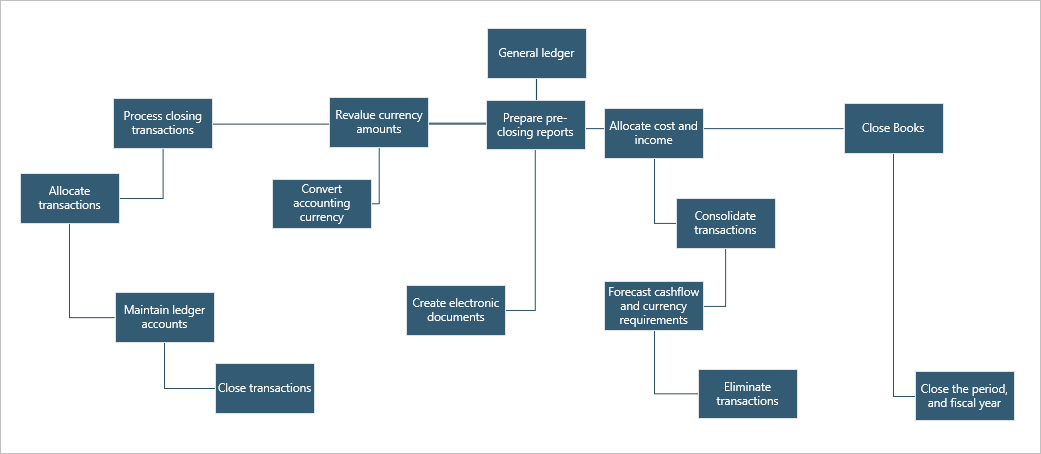
Graphic showing typical General ledger processesThe video reviewed the chart of accounts, fiscal calendars, and financial dimensions and how they're the foundation of the general ledger module.

The general ledger defines and manages your financial records. The chart of accounts displays your register of debit and credit entries. It processes closing transactions, revalues currency amounts, and closes the fiscal periods.

Accounts payable

With Dynamics 365 Finance accounts payable, you can distribute expenses, taxes, and charges across accounts. You manage your vendors, purchase orders, discounts, transactions, and invoices to reduce liability and generate greater income. You can also automate the review and payment of vendor invoices.

The following figure shows typical accounts payable business processes in an organization.
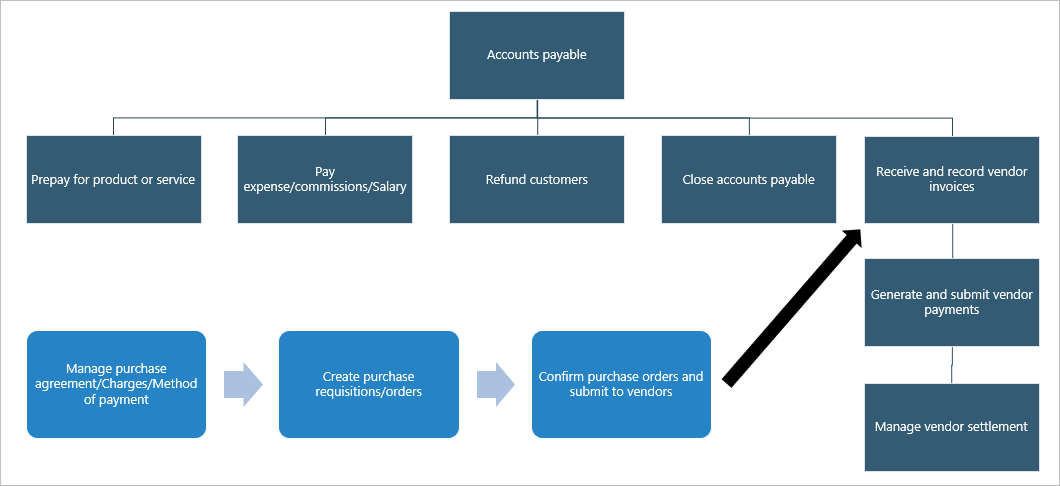
Graphic showing typical Accounts payable processes

The general ledger is a record of all invoices and payment transactions. You match purchase orders to the invoices to see if you should pay the vendor invoice. When the invoice is due, your payable clerks generate the payments, which Dynamics 365 Finance records in the general ledger, and affects the cash and bank management.

You assign purchase orders, discount groups, payment, options, vendor holds, and more to your vendors and vendor group records. You can also create and manage transaction records with purchase orders, product receipts, and invoices. When creating and managing invoices, you can check on invoice approval, payment proposals, and invoice matches.

You use accounts payable to set up and manage your vendors and vendor groups. Once complete, you assign purchase orders, discount groups, payment, options, vendor holds, and more to your vendors and vendor group records. You can also create and manage transaction records with purchase orders, product receipts, and invoices. When creating and managing invoices, you can check on invoice approval, payment proposals, and invoice matches.

Accounts receivable

The Dynamics 365 Finance accounts receivable module tracks customer invoices and incoming payments. You create and manage customers, invoice sales orders, and incoming payments while completing the daily tasks in accounts receivable.

You can also invoice customers using free text invoices, recurring invoices, and batch invoices. When you receive a customer payment, you map it to the correct invoice. You can receive payments using many payment types, such as bills of exchange, cash, checks, credit cards, and electronic payments. Dynamics 365 Finance centralized payments module allows organizations with multiple legal entities to create and manage payments using a single legal entity that manages all payments.

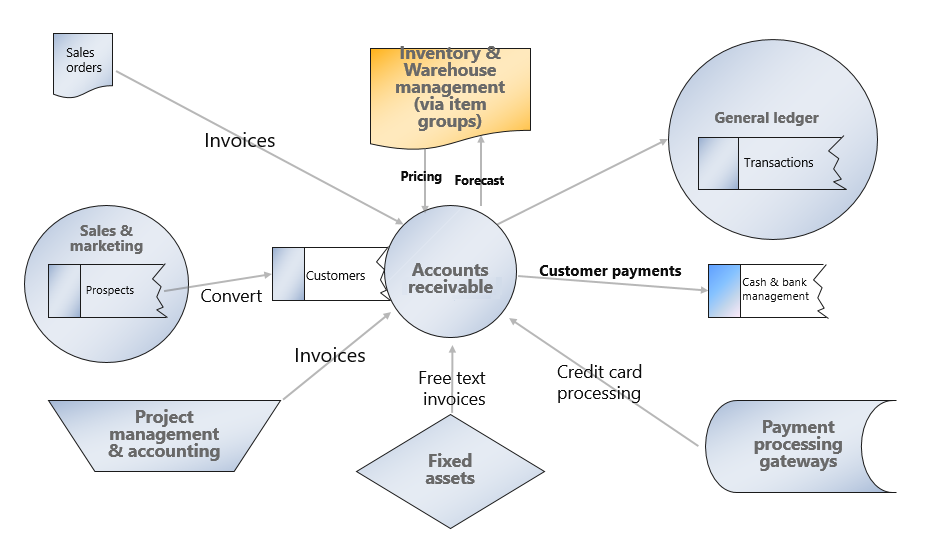
The following figure shows typical accounts receivable business processes in an organization.

customers, sale orders, customer invoicing, and receiving customer payments.

In Dynamics 365 Finance, you can create and manage customers and review sales order default values, credit limits, and on hold functions. You can create and manage sales orders, journals, subscriptions, return orders, item requirements, and sales agreements. You invoice customers using free text invoices, recurring invoices, and batch invoices, then receive a customer payment and map it to the correct invoice.

Project management and accounting

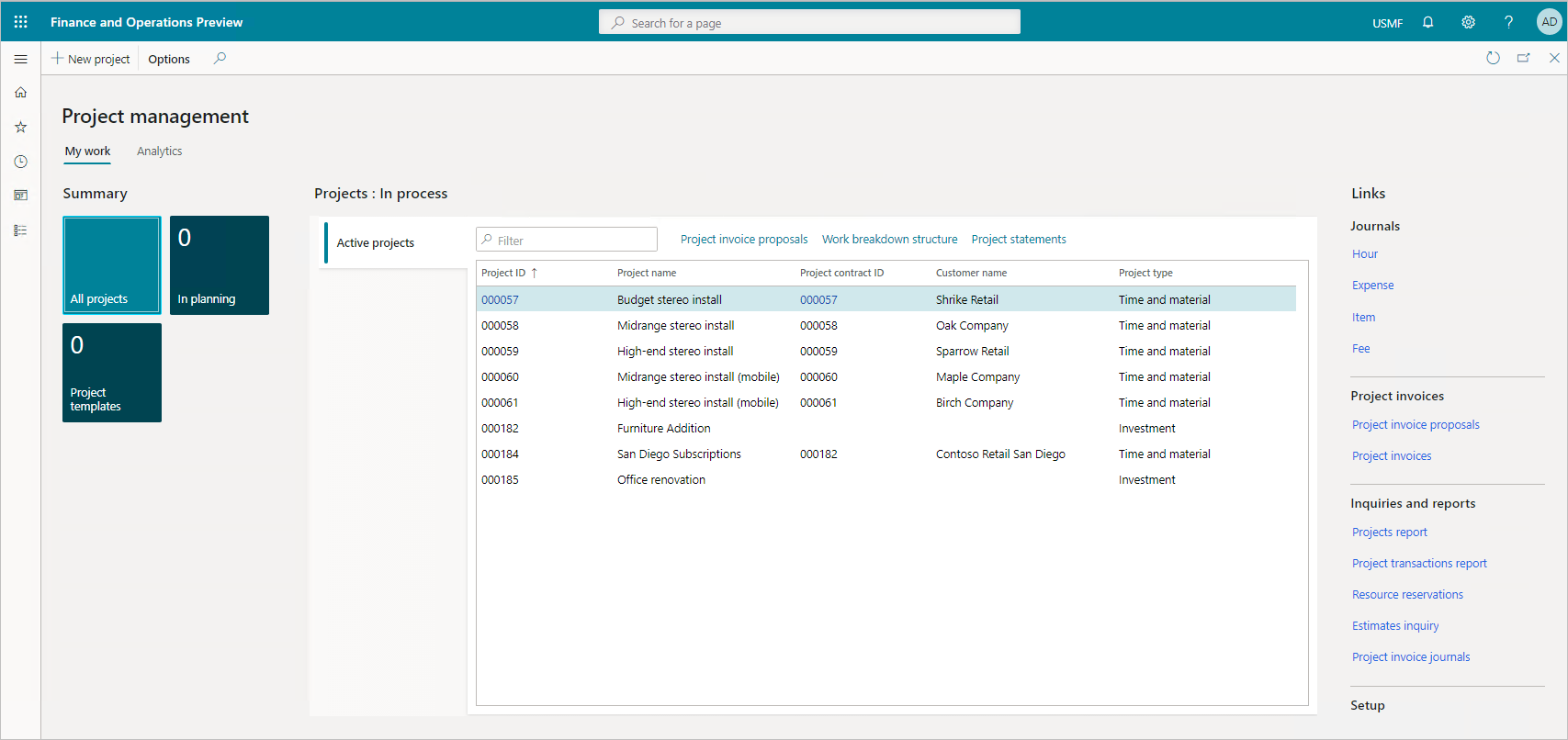
A project is a group of activities to provide a service, produce a product, or achieve a result. Projects consume resources and generate financial results in the form of revenues or assets. The Dynamics 365 Finance project management and accounting module allows you to plan, create, manage, control, and complete projects.

Screenshot of thepProject management and accounting module

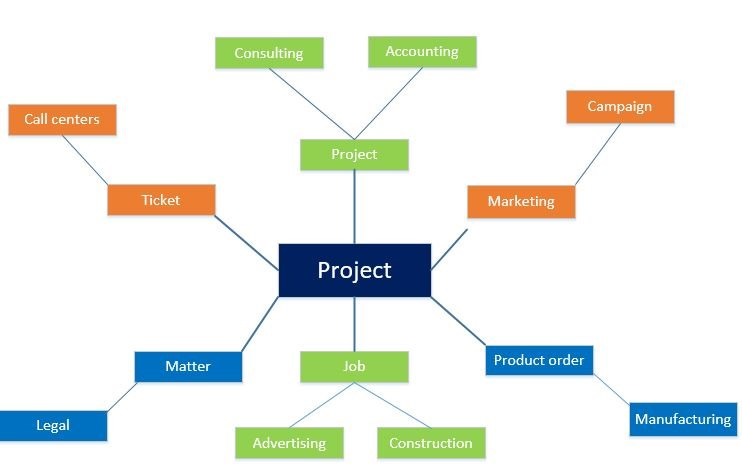
Project managers can work across multiple industries to provide a service, produce a product, or achieve a result. You can use the project management and accounting functionality in multiple industries, as shown in the following illustration.

Graphic illustrating the industries and types of projects that can be managed in Finance

For example, in a call center, a ticket describes the set of actions required to resolve a call. Consulting companies, such as management or technical consulting organizations or advertising agencies, refer to their activities as projects. In marketing, a campaign is the work delivered. In project-based manufacturing, a production order refers to the work to produce the finished goods. Whatever name you use, the projects involve resources, schedules, and costs. The project management and accounting functionality help with the planning, execution, and analysis of these projects.

Project managers:

  • Oversee the resources and finances.
  • Create project quotations, contracts, and funding sources to set project financial perimeters.
  • Review a post hour journal.
  • Create project invoice proposals as they move projects through phases.

The project type determines which invoicing procedure you apply. You can invoice the two external project types only—time and material projects and fixed-price projects. You always attach time and material projects and fixed-price projects to a project contract.

  • Time and material projects: You base the customer invoice amount on transaction lines that you enter in projects. You can invoice transactions per project or per project contract.
  • Fixed-price projects: You base the customer invoice amount on invoice billing schedules. You invoice through an on-account setup, called a billing schedule. You can invoice fixed-price projects per project or per project contract.

With either type of project, you may buy items. The module interacts with procurement and sourcing to generate a purchase order, which you settle in accounts payable.

During the execution of a project, you create invoices for your customers. The sales and marketing departments continue to manage the quotations and convert them into invoices for ongoing projects, alongside with their typical role of marketing the goods and managing the sales. You manage customer payments and refunds in accounts receivable.

By using a project contract, you can invoice one or more projects at the same time. The project contract also guarantees a consistent invoicing procedure for every subproject in a project structure. Every project you invoice must be associated with a project contract. The settings for a project contract apply to all projects and subprojects that are associated with that project contract.

the lifecycle of a project quotation in Dynamics 365 Finance, including project quotations, a work breakdown structure, approval workflow, and converting a project quotation to a project.

With project accounting, you gain an overview of project attributes. Create project quotations, contracts, and funding sources to set project financial perimeters. Review a post hour journal and create project invoice proposals as you move projects through phases.

Budgeting

With proper budgeting processes, organizations can benefit from forecasting and financial insights to compare actuals against allocated budget.

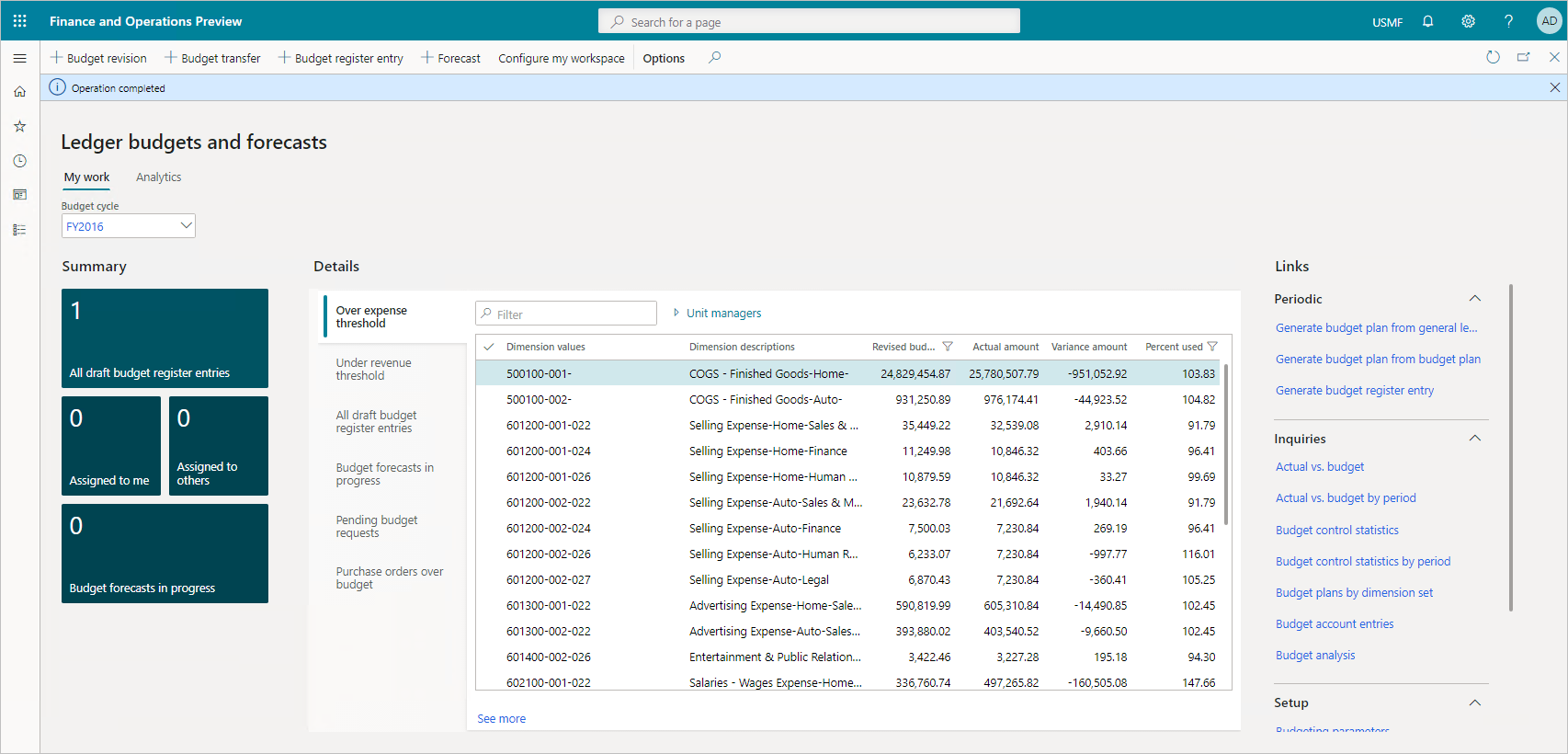
The Dynamics 365 Finance budgeting module lets you estimate the total financial requirements properly by determining the operating requirements, the fixed capital requirements, and the working capital requirements of the organization.

Screenshot of Ledger budgets and forecasts

The resource planning cycle consists of planning, budgeting, and forecasting activities. Dynamics 365 Finance supports the processes for both long-term strategic planning and quarterly and annual budget planning.

You use the budgeting module to create and assign budget codes, allocate funds, and plan for the future.

You can reduce operational expense by minimizing operational costs across business geographies with financial process automation, encumbrance, budget planning, and budget control.

After you set up and approve a budget in Dynamics 365 Finance, you convert the budget plan to a budget register entry. Budget register entries give you the tools to manage the budget and keep amounts traceable through budget codes.

Budget register entries let you revise original budgets, do transfers, and carry forward budget amounts from the previous year. Based on the established budget, you enable budget control. The level of control depends on your organizational culture and the organization's level of maturity.

Finally, you can educate employees about organizational targets and follow those targets through policies such as consider an online meeting instead of a travel.

Dynamics 365 Finance includes a budget control framework that lets you select either hard control or soft control. Hard control prevents postings that would go over the budget. Soft control warns you that you’ll exceed the available budget, but you can decide how to continue.

Dynamics 365 Finance budget control supports management of your financial resources through the:

  • Chart of accounts
  • Workflows
  • User groups
  • Source documents and journals
  • Configurable calculation of available funds
  • Budget cycles
  • Thresholds.

When controls are in place, you can plan, measure, manage, and forecast your financial resources throughout its fiscal year.

After you approve budgets in Dynamics 365 Finance, you use budget plans to generate budget register entries to record the expenditure budget for your organization. You can also create or import budget register entries from a third-party program.

Then you can set up budget planning processes to meet your policies, procedures, and requirements for budget preparation. You can view and edit budget plan documents using one or more layouts. You associate each layout with a template to view and edit the budget plan documents in Excel.
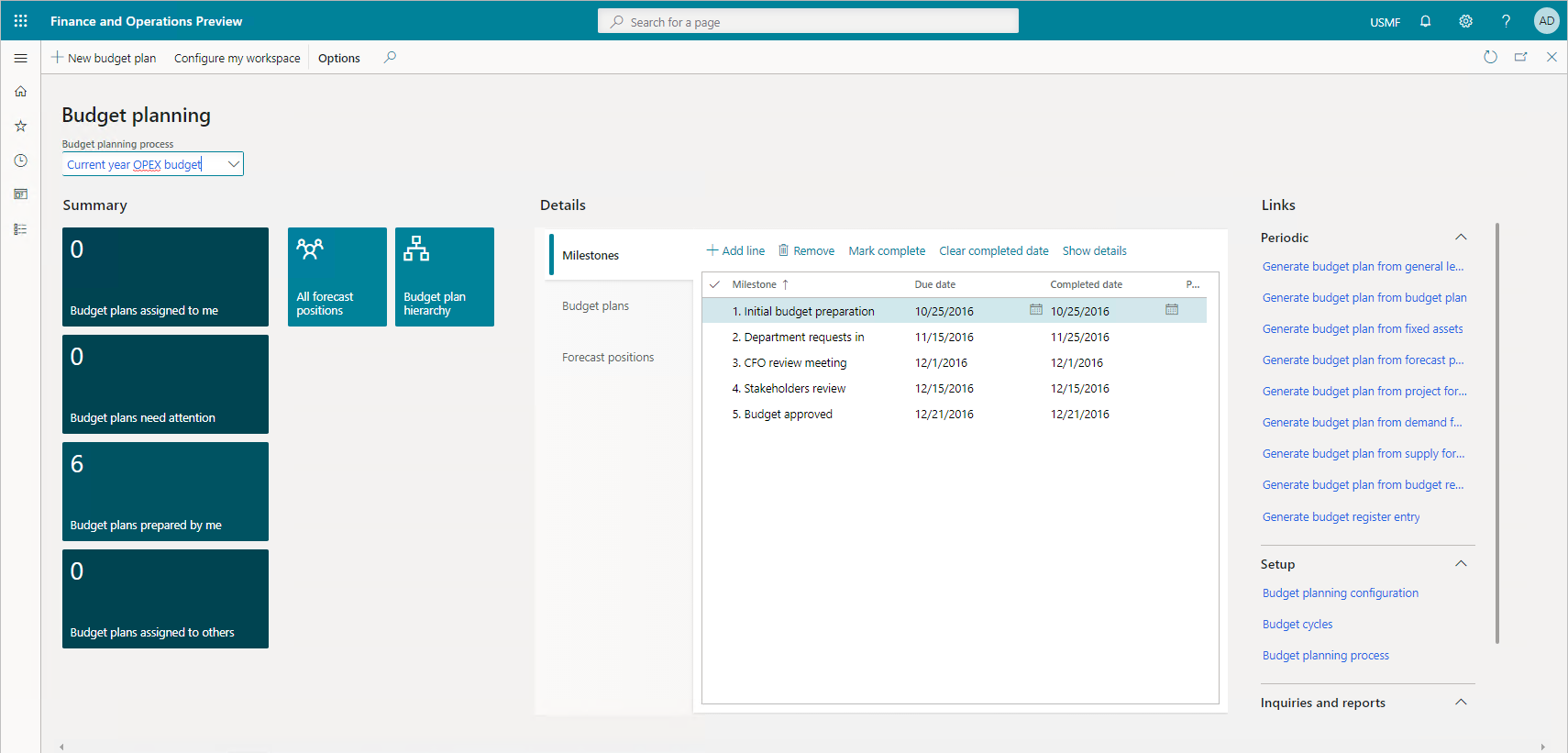
Screenshot of Budget planning

This video showed the basics of budget planning and forecasting, budget cycles, budget models, and how budget control can be configured to put a hard stop on transactions that exceed the overall budget.

You can use the budgeting module to create and assign budget codes, allocate funds, and plan for the future. You define who does budgeting, what you budget, and how the process works through a sole source of truth.

Real-time cash flow visibility

Dynamics 365 Finance offers tools, features, and a workspace with built-in intelligent controls to give real-time insight into your cash flow, product supply, and demand. It can analyze customer demographics and the cost of goods so that you negotiate advantageous agreements with your vendors and customers.

You use the cash flow forecasting tools to analyze upcoming cash flow and currency requirements to estimate your future need for cash while checking on budgeting and inventory management. It gives you better oversight and preparation for the future.

To get a forecast of your cash flow, you complete the following tasks:

  • Find and list all the liquidity accounts. Liquidity accounts are the accounts for cash or cash equivalents.
  • Configure the behavior for forecasts of transactions that affect the liquidity accounts.

After you’ve completed these tasks, you calculate and analyze forecasts of the cash flow and upcoming currency requirements.

You can integrate cash flow forecasting with the general ledger, accounts payable, accounts receivable, and budgeting and inventory management. The forecasting process uses transaction information in the system, and the calculation process forecasts the expected cash effect of each transaction.   Dynamics 365 Finance considers the following types of transactions when calculating the cash flow:

  • Sales orders: Sales orders that aren't yet invoiced, and that result in physical or financial sales.
  • Purchase orders: Purchase orders that aren't yet invoiced, and that result in physical or financial purchases.
  • Accounts receivable: Open customer transactions or invoices that aren't yet paid.
  • Accounts payable: Open vendor transactions or invoices that aren't yet paid.
  • Ledger transactions: Transactions where it's specified that a future posting will occur.
  • Budget register entries: Budget register entries selected for cash flow forecasts.
  • Demand forecasts: Inventory forecast model lines selected for cash flow forecasts.
  • Supply forecasts: Inventory forecast model lines selected for cash flow forecasts.

Although there's no direct integration with project management and accounting, there are several ways to include project transactions in the cash flow forecast. The system includes posted project invoices in the forecast as part of open customer transactions. The system includes project-initiated sales orders and purchase orders in the forecast as open orders after they're entered. You can also transfer project forecasts to a ledger budget model. You include the ledger budget model in the cash flow forecast as part of the budget register entries.

the cash and bank management workspaces, cash flow forecasting, and how to reconcile a bank statement manually.

Using real-time cash flow visibility features, such as budgeting and inventory management integrations, you get better visibility into the future. You can set up cash flow forecasts and show vendor and purchase order cash flow forecasts. With tools that give you a full-circle view of your current and future needs, Dynamics 365 Finance is a powerful tool for organizations that want control and insight.

The above content is taken from :  https://docs.microsoft.com/
Dynamics 365 Finance

Dynamics 365 Finance

Dynamics 365 Finance is Microsoft's financial management business application. It allows medium and enterprise organizations to:

  • Monitor the performance of global financial operations in real time.
  • Predict future outcomes.
  • Make data-driven decisions to drive growth.

Dynamics 365 Finance gives you deep data and process integrations across Dynamics 365, Office 365, and partner applications. It offers a centralized source of financial information. This integration saves time, eases collaboration across your organization, and enables faster, more informed decisions. It allows you to do business anywhere, anytime with an intuitive user-interface personalized for your role and preferences.

Today's CFOs must fulfill a range of responsibilities, such as reporting on the past, managing the present, and ensuring a sound future. They must navigate ever-changing local and global regulations and, more than ever, they must drive growth through strategic innovation. To meet these challenges head on, a CFO needs technology that delivers actionable intelligence for now, the next quarter, and next year. Microsoft Dynamics 365 Finance allows CFOs to instantly manage finances with current data and forecasts to support their decisions. You can check the financial health of your organization across the globe and ensure regulatory compliance for every transaction in every locality where you operate.

Benefits of Dynamics 365 Finance

Dynamics 365 Finance allows you to:

  • Drive strategic financial decisions: You can assess the health of your business, improve financial controls, optimize cashflow, and make strategic decisions to drive growth faster. You achieve this growth with Dynamics 365 Finance’s unified, global, real-time financial reporting, AI embedded analytics, and predictive insights.
  • Unify and automate financial processes: You enable smarter, faster actions and decisions with role-based workspaces that show interactive data visualization. These visualizations give you a high-level view of your key business metrics and the ability to monitor and improve the health of your business. This awareness allows you to prioritize and automate tasks to save time, reduce errors, and increase productivity with integrated tools and applications, such as Office 365.
  • Decrease global financial complexity and risk: You can adapt to changing local and global financial requirements quickly with a flexible, guided, rules-based chart of accounts and dimensions. This tracking helps you manage your financial operations accurately even with regulatory requirements that change often. The no-code configuration service simplifies regulatory and tax reports, e-invoicing, and payments.
  • Accelerate your business growth: With robust financial intelligence and embedded analytics in real time, you can adapt to changing market demands quickly and drive rapid business growth by unifying global financials and operations. It allows people to make fast, informed decisions.

Dynamics 365 Finance gives you workspaces with role-based views and functions. You can focus, prioritize, and perform with the aid of pertinent insights shared in both desktop and mobile views. This flexibility allows you to work anywhere on any device, promoting collaboration across departments, offices, and vendors.

By using built-in controls, you gain insights into your financial data and have 360-degree visibility across all operating units. These insights and visibility help you make intelligent decisions and stay competitive in the fast and ever-changing global market.

Dynamics 365 Finance:

  • Helps you elevate financial performance, drive margin revenue growth with a centralized, global financial management solution, and deliver robust financial intelligence and embedded analytics in real time. All these features contribute to increased profitability.
  • Allows you to adapt to diverse workforces and changing laws at the local level. Dynamics 365 Finance’s regulatory features include 37 countries and 42 languages. Its global electronic reporting features and configurable e-invoicing make it easy to adapt to frequent regulatory changes.
  • Simplifies financial operations with tools like vendor invoice automations, vendor collaborations, quote to cash, budget planning, budget control, expense management, and recurring invoices.
  • Allows you to achieve success locally and globally. It delivers true business value with correct and prompt regulatory reporting. It finds intelligent and predictive insights, in context and underpinned by machine learning data, which drives efficiencies, finds new market opportunities, and spurs innovation.

Dynamics 365 Finance gives you tools and services to transform your business functions and processes. It helps you meet your business requirements and supports the effort to modernize your finance functions. Integration with first- and third-party solutions helps make technology unification possible for administrative functions.

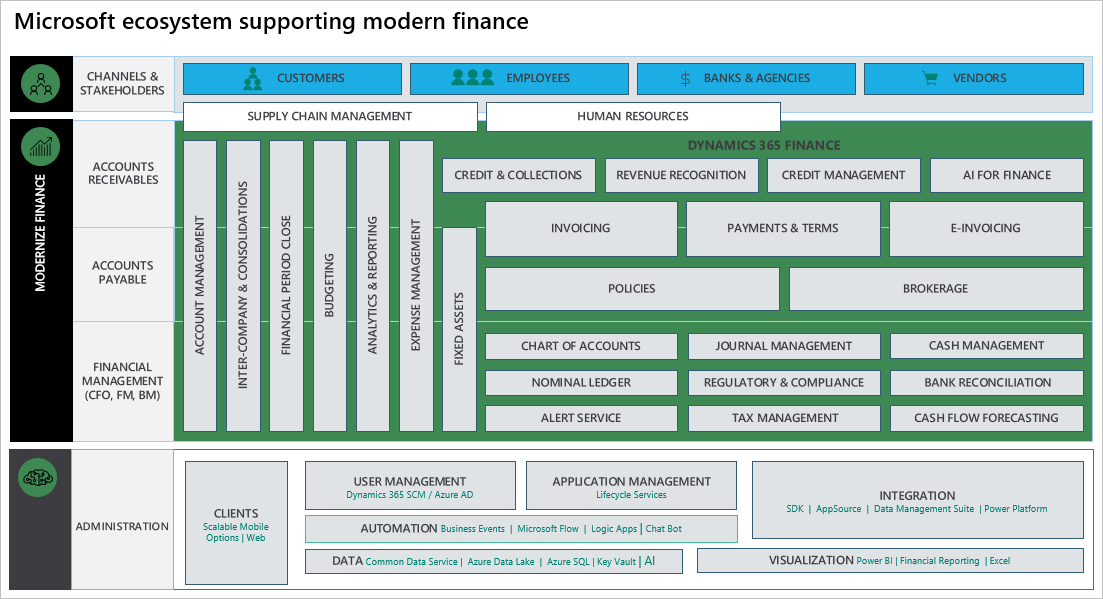
The following figure outlines the key business functions of the Microsoft system supporting modern finance with Dynamics 365 Finance.

key business functions supported by Finance

Accelerate your business growth

Dynamics 365 Finance helps you adapt to changing market demands quickly and drive business growth rapidly. It gives you unified global financials and operations features that allow you to make fast, informed decisions.

With built-in controls, you gain insight into your financial data and have a 360-degree visibility across all operating units. You can use these insights to make intelligent decisions to stay competitive in today's fast and ever-changing global market.

Elevate your financial performance

Dynamics 365 Finance helps you drive margin revenue growth with a centralized, global financial management solution. It delivers robust financial intelligence and embedded analytics in real time to help increase profitability.

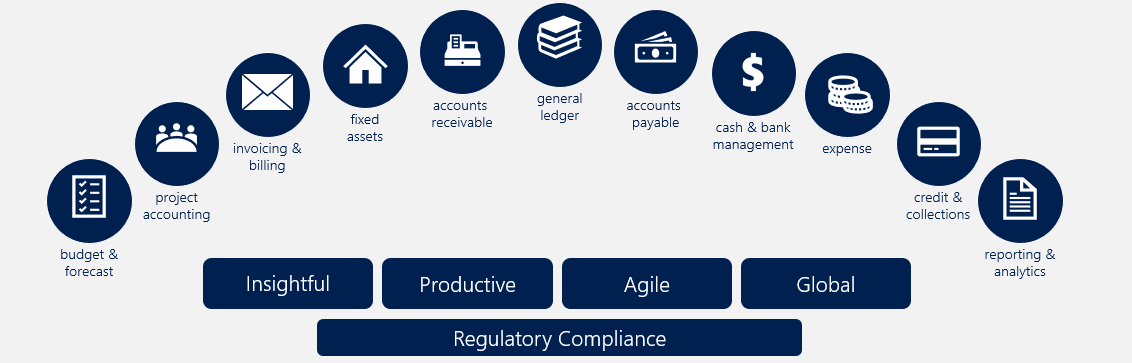
The following graphic shows the components of Dynamics 365 Finance.

Graphic showing the components of Dynamics 365 Finance.

Three main goals of a financial management system in any organization are:

  • Maximize profit: Earning maximum profits in the short term and the long term depends on financial awareness. Dynamics 365 Finance keeps all financial transactions in a ledger and offers tools and features to provide insight into incurring costs and projected revenue so that you can make proper decisions.
    • The general ledger module is the core of Dynamics 365 Finance and we integrated it with other subledgers so each department can manage its own books without disrupting the general ledger.
    • The cash and bank management module allows you to manage your banks and balances and reconcile the bank statements with the general ledger.
  • Maximize wealth: With Dynamics 365 Finance you can manage your cash flow, earn maximum wealth for your shareholders, and improve your organization's chances of success. Your organization must have a good cash flow to pay the daily expenses such as wages, rent, electricity bills, and more. Companies with a good cash flow can take advantage of opportunities such as getting cash discounts on purchases, making large-scale purchases, giving credit to customers, and more.
  • Operational consistency and efficiency: Prompt month end closing, and correct reporting are imperative for overall operational health of your organization. These tasks are critical as you give the information to management and shareholders. Dynamics 365 Finance capabilities such as a shared chart of accounts across multiple legal entities and dashboards with a global view of an organization allow you to do more.

Dynamics 365 Finance’s tools, features, and workspace with built-in intelligent controls give you insights into your organization's cash flow, product supply, and demand. It can analyze customer demographics and costs of goods so that you can negotiate advantageous agreements with your vendors and customers.

  • The accounts payable and accounts receivable modules offer you what you need to manage vendor and customer daily processes such as invoicing and generating or collecting payments.
  • The budgeting module lets you estimate the total financial requirements properly by determining how much finance is necessary to operate and what the requirements are for fixed and working capital.
  • The sales and marketing, inventory management, procurement and sourcing, cost management, and cost control modules in Dynamics 365 Supply Chain Management all contribute to making proper decisions to maximize the wealth of your organization.

The following graphic shows how the general ledger module interacts with other modules in the following scenarios:

Financial management overall process with the general ledger in the middle of all processes.

  • Cash and bank management: Dynamics 365 Finance records all incoming and outgoing funds in the general ledger. Each bank has a corresponding account in the general ledger chart of accounts. This module simplifies your ability to reconcile bank statements with financial management transactions in periodic processing.
  • Accounts payable: Dynamics 365 Finance records all invoices and payment transactions in the general ledger. Your accounts payable clerks match the purchase order with the recorded invoice to determine if you should pay the vendor invoice. On the due date, Dynamics 365 Finance generates payments that affect the general ledger cash and bank management.

The following graphic shows the accounts payable integration.

Accounts payable integration

  • Project management and accounting: In both time and materials and fixed price projects, you need to make purchases at specific times. The project management and accounting module can interact with the procurement and sourcing module in Dynamics 365 Supply Chain Management to generate purchase orders, which you settle in the accounts payable module in Dynamics 365 Finance.

During project implementation, you can create invoices for customers. Your sales department can continue managing the quotes and converting them to invoices for ongoing projects, alongside their typical role of marketing goods and managing sales. Then, you can manage customer payments in the accounts receivable module.

The following graphic shows the accounts receivable integration.

Accounts Receivable integration

The above content is taken from :  https://docs.microsoft.com/

Blog Post 6: Bonus – Building Your First Custom Copilot Plugin in X++

Blog Post 6: Bonus – Building Your First Custom Copilot Plugin in X++  Introduction In our previous posts, we explored what Copilot can do o...