Showing posts with label Dynamics 365 Marketing. Show all posts

Saturday, 12 December 2020

Segmentation and Event management in D365 Marketing

Segmentation

One of the first and most important decisions you'll make when you design a marketing piece is to choose the correct audience. Once you select your audience, you can tailor the message to best appeal to that group of people.

You usually generate marketing campaigns focused on your products or services, especially new products, and send it to existing customers based on their past buying history, organized in segments.

A market segment is the collection of contacts that you target with a customer journey. In some cases, you'll target all the contacts you have. In most cases, you'll choose who you want to target based on demographic or firmographic data and other considerations.

Unlike marketing lists, you base marketing segments on marketing insights. We designed the marketing-insights service to process data without affecting the performance of your Dynamics 365 user interface and other functions.

You use Dynamics 365 Marketing’s Segmentation Designer to set up groups of related contacts that you can target for your customer journeys. You can query across multiple related entities to target the specific demographics for a customer journey or campaign. Once you determine your segments, Dynamics 365 Marketing can calculate a score for each lead. It monitors leads until their score indicates they are sales ready.

The following graphic shows the start screen of the Segmentation Designer.
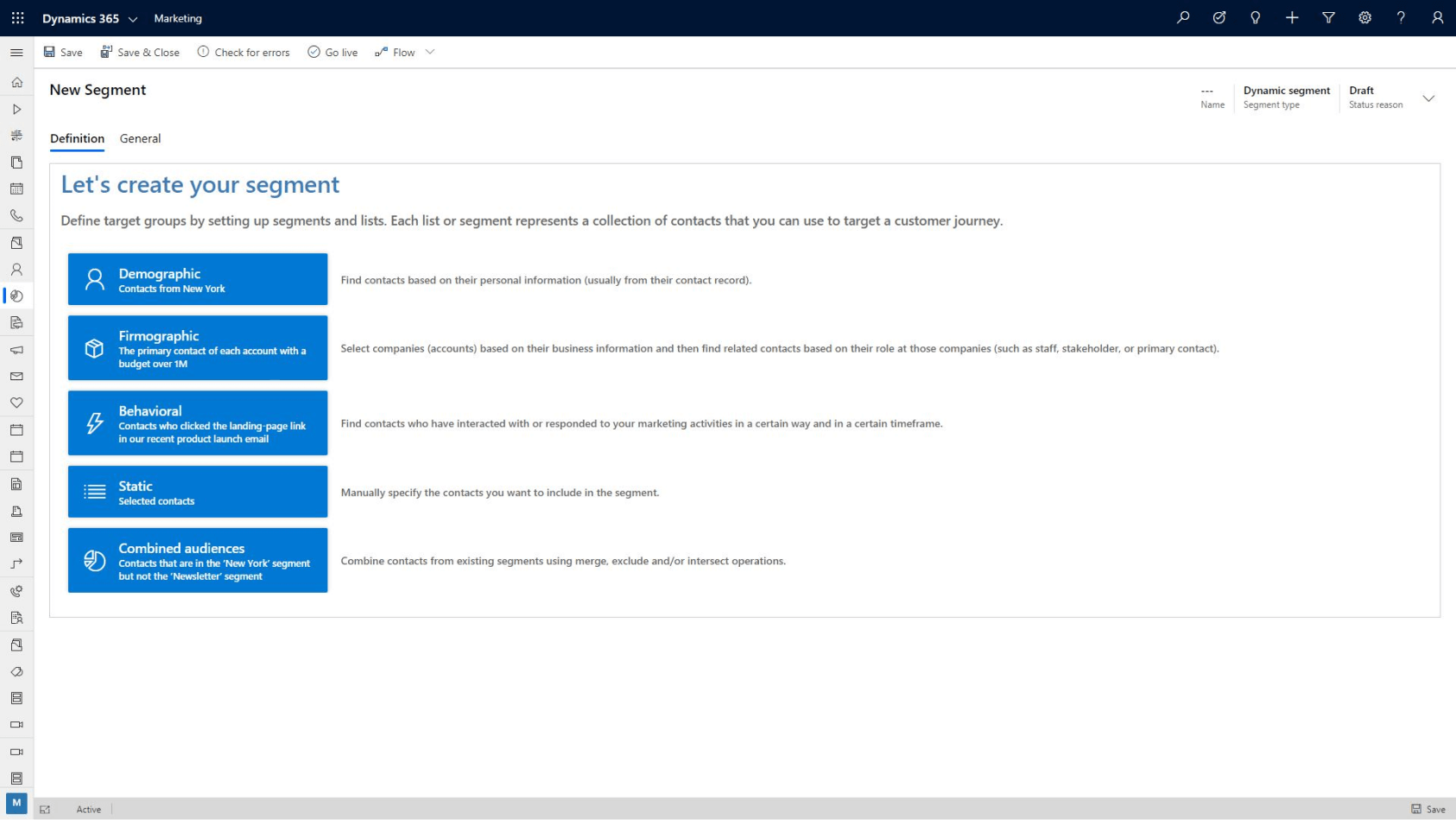
Segmentation Designer

With Dynamics 365 Marketing, you can create customer segments easily based on different qualification factors to ensure that you're marketing services to the correct customer base. You can segment customers based on:

  • Demographic: Find contacts based on their personal information stored in their contact record. For example, you can select contacts that are from New York.
  • Firmographic: Select companies based on their business information, and find related contacts based on their role at the companies. For example, you can select the primary contact of each account with a budget over 1 million dollars.
  • Behavioral: Find contacts who have interacted with or responded to your marketing activities in a specific way. For example, you can select contacts who selected the landing page link in a recent product launch email during a specified timeframe.
  • Static: Create a segment by selecting the contacts manually.
  • Combined Audiences: Combine contacts from existing segments. For example, you can select contacts that are from the New York segment and the newsletter segment.
  • Dynamics 365 marketing lets you create customer segments and control the members in those segments. You can populate customers dynamically based on common criteria, or you can combine multiple customer segments to create even more powerful and targeted lists.

Once a customer interacts with your organization, they're scored using the Lead Scoring Model Designer. It uses actions, such as opening an email, visiting a landing page, visiting your website, or attending an event, to calculate their score. Dynamics 365 Marketing places them into the best segment(s) for them, based on their demographics. Then, you can attach them to a customer journey or campaign. You can nurture customers along the sales journey and ensure that good leads aren’t lost along the way.

Finally, let's see how Dynamics 365 Marketing helps your organization manage marketing events.


Event management

When managing an event, it's often difficult to keep track of disconnected records and resources. Dynamics 365 Marketing changes that situation. It creates a single-data-silo location for event management integrated into sales and marketing business processes. You manage and process all the event details through the same portal location, resulting in an integrated event management process.

To get started planning an event with Dynamics 365 Marketing, you create an event record. The event record has all your planning details, includes links to related records, and gives you a business-process timeline. The timeline guides you through each step of the event-planning process.

Once you have an event record, you set up your event team, manage speakers and sessions, set up event passes, and set up a venue. You control every aspect of the event, from the initial planning and budgeting, through promotion and publication, to attendee registration and final analytics.

Dynamics 365 Marketing event management lets you:

  • Design the right event: The event designer lets you create an event based on your organization's goals and factors such as the intended audience, type of event, and desired business outcomes.
    • You can track and measure event logistics, such as location details and fees, as you build the event.
  • Create the right agenda: You define every session offered throughout the event including tracking details such as session location, type of session, target audience, and who will be delivering the session.
    • You can add sessions to event tracks to make it easy for attendees to find sessions that are most important to them.
  • Manage speakers and sponsors: You can keep track of the individuals and organizations that are helping to make your event happen.
    • You can track details such as speaker sessions, individual or organization bios, and manage costs and expenses related to them.
  • Manage registrations: You can manage who is planning on attending your event. You can create event passes and packages to provide the best experience possible for your attendees.
    • You can evaluate sessions popularity and use that information to help dictate future offerings.
  • Improve event experience: You can manage and publish changes to sessions, tracks, and speakers directly to the event website.
  • Drive sales activities: You can use attendance information from participants in marketing campaigns to generate leads and help drive future revenue.

Dynamics 365 Marketing is powerful tool that you can use to create and manage all aspects of your events, whether they're online or at specific locations.

The above content is taken from :  https://docs.microsoft.com/

Manage customer in D365 marketing

Manage customer journeys

With Dynamics 365 Marketing, you can create powerful customer journeys tailored to the products you're marketing and your campaign objectives. The customer journey includes customers:

  • Discovering your product
  • Evaluating whether it meets their needs
  • Looking for a good offer
  • Making a purchase.

Dynamics 365 Marketing allows you to visualize and automate that journey. Customer journeys create a model that guides a targeted marketing segment through the process. The guidance includes automated messaging, activity generation, interactive decision points, and more.

Using Dynamics 365 Marketing lets you select how simple or complex a customer journey might be. Emails, task assignments, business workflows, decision points, and internal action items can feed customized customer journeys.

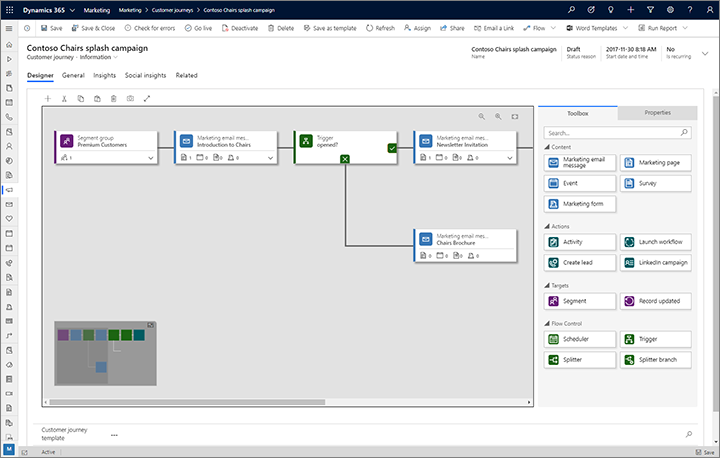
The following graphic shows the designer screen for an automated customer journey.

customer journey Manage customer in D365 marketing

With customer journeys, you can:

  • Attract the right prospects by creating campaigns that target specific customer segments across multiple channels including email marketing, web landing pages, events, telemarketing, SMS integration, LinkedIn integration, and other custom channels.
  • Create customer reusable campaign assets quickly with automation features such as configurable templates, reusable content blocks, and design tools. You can create a vast library of marketing content that you can take advantage of across different customer journeys. Tools like Power Automate can help streamline content approvals and easily integrate with third-party content management systems.
  • Personalize customer journeys by taking advantage of customer preferences and their past interactions. You can create personalized customer journeys and sync and nurture LinkedIn leads automatically with the Dynamics 365 Connector for LinkedIn Lead Gen Forms app.
  • Run business unit-level marketing and reuse shared campaign content to define the audiences you target

Journeys

As you learned in the video, you use Dynamics 365 Marketing to build rich customer marketing campaigns by including items like customer segments and pre-defined email templates. As a result, your leads are better qualified and easier to turn into sales revenue.

From simple single-email campaigns to complex, interactive customer journeys, Dynamics 365 Marketing provides a graphical, journey modeler. Using the journey modeler, you can create a full journey process. You're also able to assign tasks and trigger business workflows. Your customers’ needs and preferences drive the process, making the journey comfortable and enjoyable for them.

The success of any customer journey depends on ensuring that the journey is targeting the right prospects.

The above content is taken from :  https://docs.microsoft.com/
Dynamics 365 Marketing Lead qualification

Lead qualification

Dynamics 365 Marketing nurtures leads through a qualification process and then gives qualified leads to the sales team.

With Dynamics 365 Marketing, you can easily create automated multichannel campaigns, using the Customer journey designer. You define the path that specific leads in different demographics follow to qualification or create leads from prospect submissions made on custom landing pages automatically. As contacts interact with your marketing initiatives, you can create leads manually or automatically. Dynamics 365 scores the contacts based on their interactions with your campaigns.

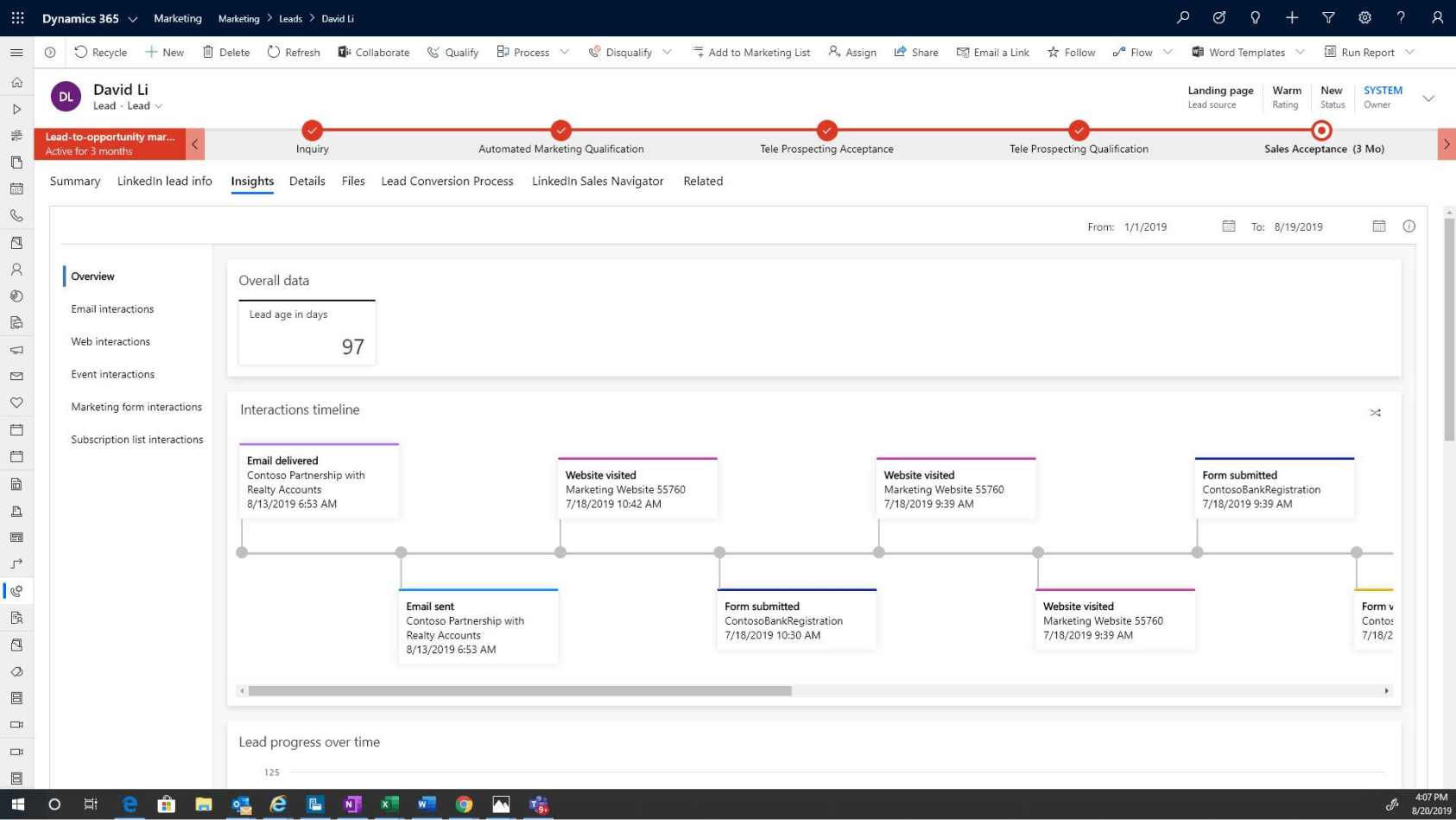
The following screenshot is a lead qualification screen.

Lead qualification screen.

With Dynamics 365 Marketing, you can:

  • Create a single view of prospects: You can unify data across contacts, leads, and customers with Dynamics 365 Marketing and Dynamics 365 Sales.
  • Target the right people: You can find, target, and close top accounts with personalized, account-based content and nurture activities.
  • Prioritize leads: You can create customized lead-scoring models and sales readiness grades that find leads across all touch points easily.
  • Increase productivity: You can use marketing automation features to give promising leads to the sales team and drive follow-ups automatically.
  • Boost productivity and simplify collaboration: You can use familiar Office 365 tools, shared calendars, and cross-team visibility to improve the handling of campaigns and leads.

With Dynamics 365 Marketing, you can create custom lead scoring models easily based on how customers interact with your organization. This scoring ensures that you're focusing your efforts on what you consider to be the best leads

As you learned in the video, Dynamics 365 Marketing makes it easy to find and target the right leads. With customized lead scoring models, you can also create customer segmentation.

Dynamics 365 Marketing gives you options for generating, managing, nurturing, and qualifying leads. These options include:

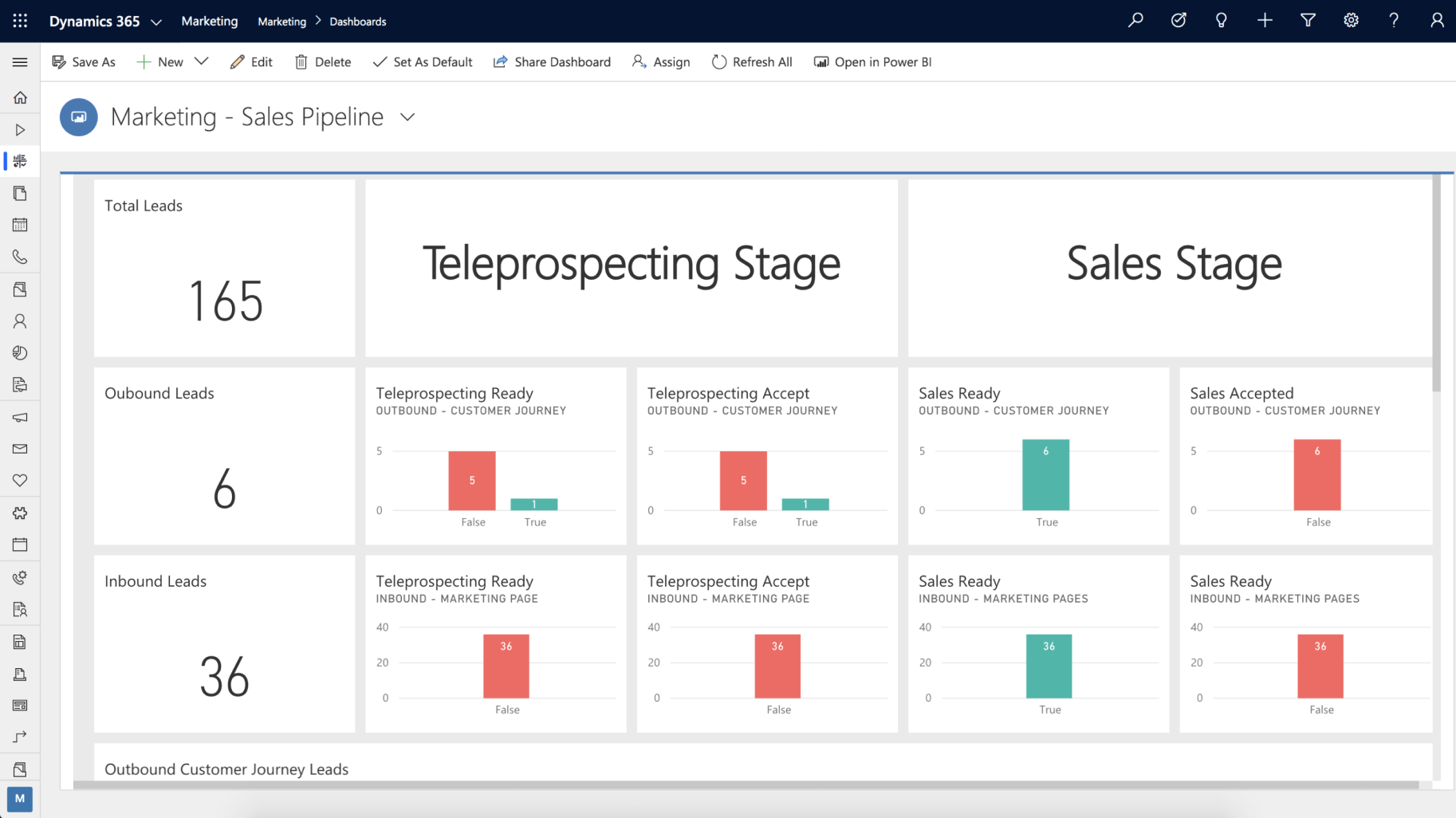
  • Creating leads by reviewing your marketing sales pipeline dashboard.
  • Using a multi-channel campaigns to target leads.
  • Managing and qualifying leads to sales.

Dynamics 365 Marketing


Dynamics 365 Marketing

Modern marketers need smarter ways to find the right prospects and build long-lasting relationships. We designed Dynamics 365 Marketing to help you find and nurture the right leads. With Dynamics 365 Marketing, you can run multi-channel marketing campaigns to attract the right prospects. These campaigns can include email, web, events, text messaging, and custom channels.

You can use Dynamics 365 Marketing to:

  • Turn prospects into business relationships by finding and nurturing more sales-ready leads using multi-channel campaigns across email, web, LinkedIn, and events.
  • Easily create campaigns using customizable templates and drag-and-drop design tools. Nurture leads with personalized marketing messages and a customer’s journey guided by their behavior.
  • Enable sales and marketing to target specific accounts that are most likely to generate the largest revenue with account-based marketing. Sales and marketing teams share one source of information and connected tools and processes With Microsoft Dynamics 365 and Office 365.
  • Automate lead follow-ups and check the progress of every deal. Use AI to improve targeting and email open rates. With out-of-box dashboards and marketing analyzers, you gain insights and can build custom dashboards to analyze campaign performance. The information helps you make smarter decisions and improve marketing results.
  • Grow your marketing operations with an application that is easy to tailor, extend, and connect to other apps and services you already use.

Lead generation

Dynamics 365 Marketing helps you plan, automate, and monitor the full customer journey. Prospects travel from discovery, through nurturing, and onward to become marketing-qualified leads.

As you engage with leads through marketing initiatives, not all leads are going to respond the same. Some leads will identify with your organization and will be more likely to respond to communication they receive. Other leads may not be as invested and won't respond or engage as often. Marketing lets you prioritize which leads to focus on with customizable lead scoring rules. These rules tell you which leads are most engaged based on how they interact with your marketing campaigns automatically.

Dynamics 365 Marketing helps you to create, nurture, and prioritize leads. You can run targeted, multi-channel campaigns and personalize each customer’s journey to generate more sales-ready leads. By personalizing the customer experience, you can predict the customer’s intent, get a holistic view of your customers, and orchestrate a connected, personalized journey.

With Dynamics 365 Marketing, you can build relationships at scale and gain credibility by finding stakeholders and decision-makers.

Dynamics 365 Marketing also helps you gain strategic insights to make better decisions and improve the performance of your marketing business processes. These insights help you improve automated marketing performance with AI-driven insights, lead scoring, and custom dashboards.

You can target and connect with LinkedIn audiences by importing leads generated using LinkedIn’s lead tools. We bundled this feature with Dynamics 365 Marketing but is also available as an add-on for other Dynamics 365 products.

As contacts interact with your marketing initiatives, you'll generate leads to represent expressions of interest made by those contacts. You might generate a lead manually after a meeting or phone conversation, or you might allow the system to generate the leads automatically. You generate leads in one of the following ways:

  • Use Dynamics 365 Marketing to create a lead and link it to a new or existing contact manually.
  • Import leads from a file that you map to a new or existing contact or account manually.
  • Sync leads from LinkedIn Lead Gen Forms and match them to a new or existing contact or create a new linked contact.
  • Create a lead with the create-lead tile in a customer journey. You can link the leads to either a new or existing contact or account, depending on the tile and customer journey settings.

Dynamics 365 Marketing can also create a lead when a customer opts in from either a landing page or an event registration. It will match the lead to a new or existing contact or account.

Integration with Dynamics 365 Sales

You can create a single customer record across marketing and sales. Shared records mean that when marketing hands off to sales, the sales team knows everything about the customers and their history with the brand.

Since Dynamics 365 Marketing integrates with Dynamics 365 Sales, you can connect sales and marketing functions. The connection helps you set up automated follow-up sales activities for your marketing campaigns to ensure you're tracking the progress of every lead.

Custom email messages and marketing pages allow you to better communicate and interact with your prospects and customers. You can combine the emails and pages into interactive customer journeys. The journeys help you develop and nurture leads through personalized experiences. For example, you can send an email to a customer segment that includes links to different product marketing pages. Depending on which link customers select, you may send more targeted communications.

The following image shows the integration between the marketing and the sales pipelines.

Dynamics 365 Marketing,D365 marketing,D365 Lead generation,lead D365 marketing,Integration D365 marketing,D365 sales

Blog Post 6: Bonus – Building Your First Custom Copilot Plugin in X++

Blog Post 6: Bonus – Building Your First Custom Copilot Plugin in X++  Introduction In our previous posts, we explored what Copilot can do o...