Saturday, 19 October 2019

The property ‘ComputedFieldMethod’ must be set with the name of a valid data entity method if ‘IsComputedField’ is set to ‘Yes’. D365 Error

D365 Error : The property ‘ComputedFieldMethod’ must be set with the name of a valid data entity method if ‘IsComputedField’ is set to ‘Yes’.


Solution :
Set the "Is Computed Field" property of the field  to No.

Thanks,
Vikas Mehta.

RUN REPORT FROM BUTTON CLICK IN AX 2012

RUN REPORT FROM BUTTON CLICK IN AX 2012 
void clicked()
{
    Args                args;
    ReportRun       reportRun;
    CustTrans       custTrans;
    ;
     select firstonly custTrans where custTrans.recid == '1231232';
    args    = new args();
    args.name(reportstr(ReportName)); // Report name to be called
    args.record(custTrans); 
    args.parm(custTrans.transID); // In case there are additional paramters..
    reportRun = classFactory.reportRunClass(args);
    reportRun.init();
    reportRun.run();
}

Thanks,
Vikas Mehta

Make sure that SQL Server Reporting Services is configured correctly. SSRS AX 2012 ERROR

Make sure that SQL Server Reporting Services is configured correctly. Verify the Web Service URL and Report Manager URL configuration in the SQL Reporting Services Configuration Manager.

Above error is caused because the AX was not being installed with Admin rights on sql.

steps to resolve :
1) Run AX as admin.
2) In AX -> system admin module > Report server settings > validate
3) If you get succeeded , then the issue is solved.
4) In case you are still facing this issue then check the rights on the ssrs .(in case the report is deployed on different server you will need to make sure theat the rights are assigned there too).

Thanks,
Vikas Mehta.

QueryExecuting Event handler in D365

Event Handler for Query Eecuting in D365

  [FormDataSourceEventHandler(formDataSourceStr(SalesTable, SalesLine), FormDataSourceEventType::QueryExecuting)]
    public static void SalesLineCurrencyID_OnQueryExecuting(FormDataSource sender, FormDataSourceEventArgs e)

    {

        sender.query().dataSourceName(sender.name()).addRange(fieldnum(SalesLine,     CurrencyID)).value(queryValue('INR'));

    }

THANKS

Monday, 14 October 2019

D365 FUNCTIONAL INTERVIEW QUESTIONS [UPDATED 2021]

D365 F&O FUNCTIONAL INTERVIEW QUESTIONS

Below are the general functional interview questions asked .Please note that the interview questions might vary based on the role /requirement of the functional role /module. eg.Trade and logistics consultant,functional consultant,Manufacturing,etc.
eg

Dynamics 365 Functional Interview Questions

  • Sales Process
  • Purchase Process , matching Rule 
  • Production Process(Production role)
  • Inventory posting
  • Environment setup
  • Workflows /Number sequence setup
  • Types of document creation like FDDs and approach.
  • Company setup, Financial integration overview
  • Financial Essentials,how to block transactions of any user.
  • Using Dimensions
  • General ledger
  • Chart of accounts setup
  • Ledgers, Journals and Postings
  • Ledger posting setup
  • Different documentation and their analogy
  • Inventory costing, variance posting analysis
  • Reconciliation for Inventory and Cash
  • Sales TAX Setup and Configure
  • Fixed assets overview, setup, listing and postings and transactions
  • Budgeting and Planning
  • Budget iterations with Fixed Assets
  • Bank accounts and overview of Credit card integration and options
  • Intercompany accounting transactions and postings
  • Payment authorizations workflow
  • Multi-currency, multi-language and multi-company setup
  • AR/AP Setup, Postings, Transactions
  • Vendor payments, Customers payments
  • Inventory close, Year end, Month end close activities and procedures
  • Understand Forms, Reports, Setup and Parameters for Financial flow and process
  • Cash and Bank management setup
  • Financial statements
  • Balance sheet reporting
  • Income statement and Summary & Detail statements for Payments and Cash flow
  • AR and AP reconciliation
  • Document handling and Dashboard
  • Inquiries and Reports and Functions
  • All Financial Month end close processes in Microsoft Dynamics AX
  • Business decisions using Dynamics AX Reports and Workflows and Approvals
  • DIXF Import Export process with example.and challenges
  • Advanced Inventory concepts
  • Scenario based question and provided solution.
  • Approach of Custom developments for some process.
  • Inventory valuation process
  • Monthly inventory closure procudure
  • Explain LIFO, FIFO, and standard in inventory.
  • Difference transfer order and transfer journal
  • Difference between different journals

 GENERAL QUESTIONS :

What is your role in project?

How many Dynamics implementations have you completed?

What industries do you have experience in?

Tell me about the biggest challenge you’ve faced in your recent projects and how you overcame it.

What are your strongest functional skills?

Are you just limited to a particular module or you would like to explore other areas of functional consultant also ?

Saturday, 12 October 2019

how to get all datasource in form event handlers in dynamics d365

how to get all datasource in form event handlers in dynamics d365

[FormEventHandler(formStr(HcmWorkerPositions), FormEventType::Closing)]
    public static void HcmWorkerPositions_OnClosing(xFormRun sender, FormEventArgs e)
    {
        FormRun         element = sender;
        FormRun         formrun;
        FormDataSource  formDatasource;
        int             idx;
        str             name;

        formrun = element.args().caller();

        name = element.args().callerName();
//sender.dataSource(formDataSourceStr(HcmWorkerPositions, hcmWorker)); you can also try this.
        if(formrun && name == 'hcmWorker')//hcmworker is second datasource.
        {           
            for(idx=1;formrun.dataSourceCount();idx++)
            {
                if(formrun.dataSource(idx).cursor() is HcmEmploymentDetail)
                {
                    formDatasource = formrun.dataSource(idx);
                    formDatasource.research(true);
                    break;
                }
            }
        }
    }

WHAT IS METHODS IN DATA ENTITY IN D365

DATA ENTITY METHODS CALLING SEQUENCE IN D365

Data entites method calling sequence in D365FO


Here is a sequence of method’s calls during export:
1. initValue
2. validateField
3. validateWrite
4. update
4.1. doUpdate
4.1.1. persistEntity
4.1.1.1. doPersistEntity
4.1.1.1.1. initializeDataSources
4.1.1.1.1.1. initializeEntityDataSource
Note: initializeDataSource is called once for each DataSource in Entity.
4.1.1.1.2. mapEntityToDataSources
Note: initializeDataSource is called once for each DataSource in Entity.
4.1.1.1.3. saveDataSources
4.1.1.1.3.1. updateEntityDataSource
4.1.1.1.4. mapEntityToDataSource (maybe for another record)
4.1.1.1.5. saveDataSources
4.1.1.1.5.1. updateEntityDataSource for update operation and (insertEntityDataSource for insert)
4.1.1.1.5.1.1. mapDataSourceToEntity
4.1.1.1.5.1.2. doSaveDataSource
4.1.1.1.5.1.2.1. updateDataSource
4.1.1.1.5.1.2.1.1. preupInsertDataSource
4.1.1.1.5.1.2.1.1.1. validateWrite of table
Plus:
postLoad
This method is called during the export for setting the value to unmapped fields after entity is downloaded to datasource.

EXPORT:
       Entity- postLoad()
       staging - insert()
       Entity- postLoad() - depends on records

IMPORT:
       staging - postLoad()
       Entity - postLoad()
       Entity - initValue()
       Entity - validateField() - depends on no of fields
       Entity - validateWrite()
       Entity - insert() / update()
       Entity - persistEntity()
       Entity - initializeEntityDataSource()
       Entity - mapEntityToDataSource()
       Entity - insertEntityDataSource() / updateEntityDataSource()
       Entity - mapDataSourceToEntity()
       staging - postLoad()

EVENT HANDLERS IN D365

EVENT HANDLERS IN D365 

With D365 event handlers play very important and hence we need to know how and when to use them to maximum benefit.
Below are some of the codes which uses event handlers in different situation and how the form source are cached.These code needs to be return in a new class with final.
eg. final class HcmPos_Extension
{
}
if you decorate your class with the [ExtensionOf(formStr(HcmPosition ))] then you can also write the code for the table extensions
in the same class.
So let us consider the form HcmPosition .
In order to create an event handler for a method just right click and copy the event handler as shown below.
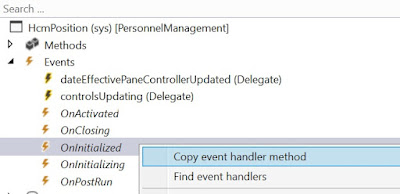
EVENT HANDLERS IN D365 ,dynamics 365 event handler,PostHandlerFor,PreHandlerFor,DataEventHandler,FormEventHandler,OnInitialized,how to event handlers,FormEventType::Initialized,pre and host handler,coc,chain of commands, event handler in d365 code,modified event in d465 prehandler,validate,update,delete,insert,formdatasource,sender,formrun

1)
/// <summary>
///
/// </summary>
/// <param name="sender"></param>
/// <param name="e"></param>
[FormEventHandler(formStr(HcmPosition), FormEventType::Initialized)]
public static void HcmPosition_OnInitialized(xFormRun sender, FormEventArgs e)
{     
FormDataSource hcmposition_ds = sender.dataSource(formDataSourceStr(HcmPosition, HcmPosition));

 //you can also directly specify the datasource name - > //sender.dataSource('HcmPosition');
 }
As shown in the above example you can get the datasource and do further coding as per the requirement.

 [FormEventHandler(formStr(HcmPositionMassUpdate), FormEventType::Initialized)]
    public static void HcmPositionMassUpdate_OnInitialized(xFormRun _sender, FormEventArgs _e)
    {
        // Initialize the instance of this form extension handler now that the controls exist
        FormRun positionMassUpdateForm = _sender as FormRun;
        HcmPositionMassUpdateFormEventHandler extensionInstance = positionMassUpdateForm.getExtensionInstance(classStr(HcmPositionMassUpdateFormEventHandler));
        extensionInstance.init();
    }

2) how to get the current selected record in the event handler when clicked on some button.
Below code will give you the selected record in the hcmposition variable.
You can get the form run also.
[FormControlEventHandler(formControlStr(HcmPosition, HcmPositionNewPosition), FormControlEventType::Clicked)]
        public static void HcmPositionNewPosition_OnClicked(FormControl sender, FormControlEventArgs e)
        {

            HcmPosition hcmposition = sender.formRun().dataSource(1).cursor();//hcmposition is the //primary datasource.

        FormButtonControl callerButton = sender as FormButtonControl;  //Retrieves the button
        FormRun form = sender.formRun(); //Gets the formRun

In case you want to select any other datasource you can do the following

        FormDataSource hcmWorker_ds = form.dataSource(formDataSourceStr(HcmWorker, HcmWorker)) as FormDataSource;

        FormDataSource HcmPositionDetail_ds= form.dataSource(formDataSourceStr(HcmWorker, HcmPositionDetail)) as FormDataSource;

        HcmWorker hcmWorker = hcmWorker_ds.cursor();

        //Set up args with all of the information you've retrieved     
    }

3) In order to get the formrun use the below
 FormRun formRun = sender.formRun() as FormRun;

4) In order to validate a std field you will have to use the below code.
    /// <summary>
    /// Event handler for the validated event on the BudgetPurposeType field on the HcmTmpBudgetPurposeType data source on the HcmPositionMassUpdate form.
    /// </summary>
    /// <param name="_sender">The form control raising the event.</param>
    /// <param name="_e">Args for the event.</param>
    [FormDataFieldEventHandler(formDataFieldStr(HcmPositionMassUpdate, HcmTmpBudgetPurposeType, BudgetPurposeType), FormDataFieldEventType::Validated)]
    public static void BudgetPurposeType_OnValidated(FormDataObject _sender, FormDataFieldEventArgs _e)
    {
        HcmTmpBudgetPurposeType tmpBudgetPurposeTypeLocal;
        HcmTmpBudgetPurposeType hcmTmpBudgetPurposeType = _sender.datasource().cursor();

        // Validate for duplicates.
        tmpBudgetPurposeTypeLocal.setTmpData(hcmTmpBudgetPurposeType);

        select firstonly RecId from tmpBudgetPurposeTypeLocal
                    where tmpBudgetPurposeTypeLocal.BudgetPurposeType == hcmTmpBudgetPurposeType.BudgetPurposeType
                    && tmpBudgetPurposeTypeLocal.LegalEntity == hcmTmpBudgetPurposeType.LegalEntity;

        if (tmpBudgetPurposeTypeLocal.RecId)
        {
            throw error("@Workforce:TheBudgetPurposeTypeIsAlreadyInUse");
        }
    }


3) Similarly if you want to write code on form modified or active on initialize you can use the below code
Sales Table Form --> Events --> OnActivated

 ////</summary>
     ////<param name="sender"></param>
     ////<param name="e"></param>
    [FormDataSourceEventHandler(formDataSourceStr(SalesTable, SalesTable), FormDataSourceEventType::Activated)]
    public static void SalesTable_OnActivated(FormDataSource sender, FormDataSourceEventArgs e)
    {
        boolean     allowEdit = true;

   
        SalesTable           SalesTable     = sender.cursor();
        FormDataSource      salesTable_ds  = sender.formRun().dataSource("SalesTable");
        FormRun             element       = sender.formRun();
        FormControl         ShippingDateRequested   = element.design(0).controlName("Delivery_ShippingDateRequested");
     
        if (ShippingDateRequested    == datenull())
{
ShippingDateRequested.enabled(false);
}
else
{
ShippingDateRequested.enabled(true);
}
    }

similarly you can write pre and post event handlers as below for different tables.
 [PostHandlerFor(tableStr(InventTrans), tableMethodStr(InventTrans, AmountMst))]
    public static void InventTrans_Post_anyValidateMethod(XppPrePostArgs args)
    {
        boolean ret = args.getReturnValue();
        InventTrans  InventTrans = args.getThis() as InventTrans;
        if (InventJournalName::find(InventTrans.Qty > 0 && InventTrans.CostPrice == 0)
        {
            ret = checkFailed(strFmt("Cost Price is 0 for Line %1",InventTrans.LineNum));
        }
        args.setReturnValue(ret);
    }

Below code executes after the standardd init method of the formMethodStr(HcmPositionMassUpdate, init)
if you wan to do somthing befoore the code execution write a pre event handler
  /// <summary>
    /// Post-event handler for the init method of the HcmPositionMassUpdate form.
    /// </summary>
    /// <param name="_args">Args for the event.</param>
    [PostHandlerFor(formStr(HcmPositionMassUpdate), formMethodStr(HcmPositionMassUpdate, init))]
    public static void HcmPositionMassUpdate_Post_init(XppPrePostArgs _args)
    {
        FormRun positionMassUpdateForm = _args.getThis();

        HcmPositionMassUpdateBase positionMassUpdateBase = positionMassUpdateForm.parmPositionMassUpdateBase();
        Args args = positionMassUpdateBase.parmFormArgs();

        if (args.record() && args.record().TableId == tableNum(HcmPositionForecastScenario))
        {
            HcmPositionMassUpdateFormEventHandler::disableFinancialDimensionTab(args, positionMassUpdateForm);
        }
    }


 [DataEventHandler(tableStr(HcmPositionWorkerAssignment), DataEventType::Deleted)]
    public static void HcmPositionWorkerAssignment_onDeleted(Common _sender, DataEventArgs _e)
    {
        HcmWorkerHelper::getDepartmentRecIdsCacheClear();
    }


    [DataEventHandler(tableStr(HcmPositionWorkerAssignment), DataEventType::Inserted)]
    public static void HcmPositionWorkerAssignment_onInserted(Common _sender, DataEventArgs _e)
    {
        HcmPositionWorkerAssignment positionWorkerAssignment = _sender as HcmPositionWorkerAssignment;

        PayrollWorkerTaxRegion::refreshTaxRegionsForWorkerAtPosition(positionWorkerAssignment.Worker, positionWorkerAssignment.Position);
    }

In case there are some changes which needs to be done in a standard method in between the code.
    /// <summary>
     /// </summary>
    public void initForm()
    {
        next initForm();
        //do something here.
    }

Thanks,
Vikas Mehta.

Friday, 11 October 2019

GET DEBIT CREDIT VALUES OF VOUCHER IN D365 CODE

GET DEBIT CREDIT VALUES OF VOUCHER IN D365 CODE

public void getvoucherDetails(Args _args)
{
LedgerJournalEngine ledgerJournalEngine;
LedgerJournalTrans ledgerJournalTrans;
LedgerJournalTable  ledgerJournalTable;

ledgerJournalTable.clear();
ledgerJournalTrans.clear();
               
select firstonly ledgerJournalTrans
     where ledgerJournalTrans.Voucher == "V00001"; //Add voucher number
ledgerJournalEngine = new ledgerJournalEngine();
ledgerJournalTable = ledgerJournalTable::find(ledgerJournalTrans.JournalNum);
ledgerJournalEngine.newJournalActive(ledgerJournalTable,true);
info(strFmt("%1 - %2", ledgerJournalEngine.voucherDebit(ledgerJournalTrans), ledgerJournalEngine.voucherCredit(ledgerJournalTrans)));

}
Thanks,
Vikas Mehta.

HOW TO GET CURRENT ONHAND INVENTORY AVAILABLE PHYSICAL IN D365 FO

GET CURRENT ONHAND INVENTORY IN D365 FO

public InventQtyAvailPhysical onHandInventory(ItemId _itemId, InventDimId _inventDimId)
{
    InventOnhand    inventOnhand;
    InventDim       inventDim = inventDim::find(_inventDimId);
    InventDimParm   inventDimParm;

    inventDimParm.initFromInventDim(inventDim);
    inventOnhand = InventOnhand::newParameters(_itemId, inventDim, inventDimParm);
    return inventOnhand.availPhysical();
}

Thanks,
Vikas Mehta

Blog Post 6: Bonus – Building Your First Custom Copilot Plugin in X++

Blog Post 6: Bonus – Building Your First Custom Copilot Plugin in X++  Introduction In our previous posts, we explored what Copilot can do o...